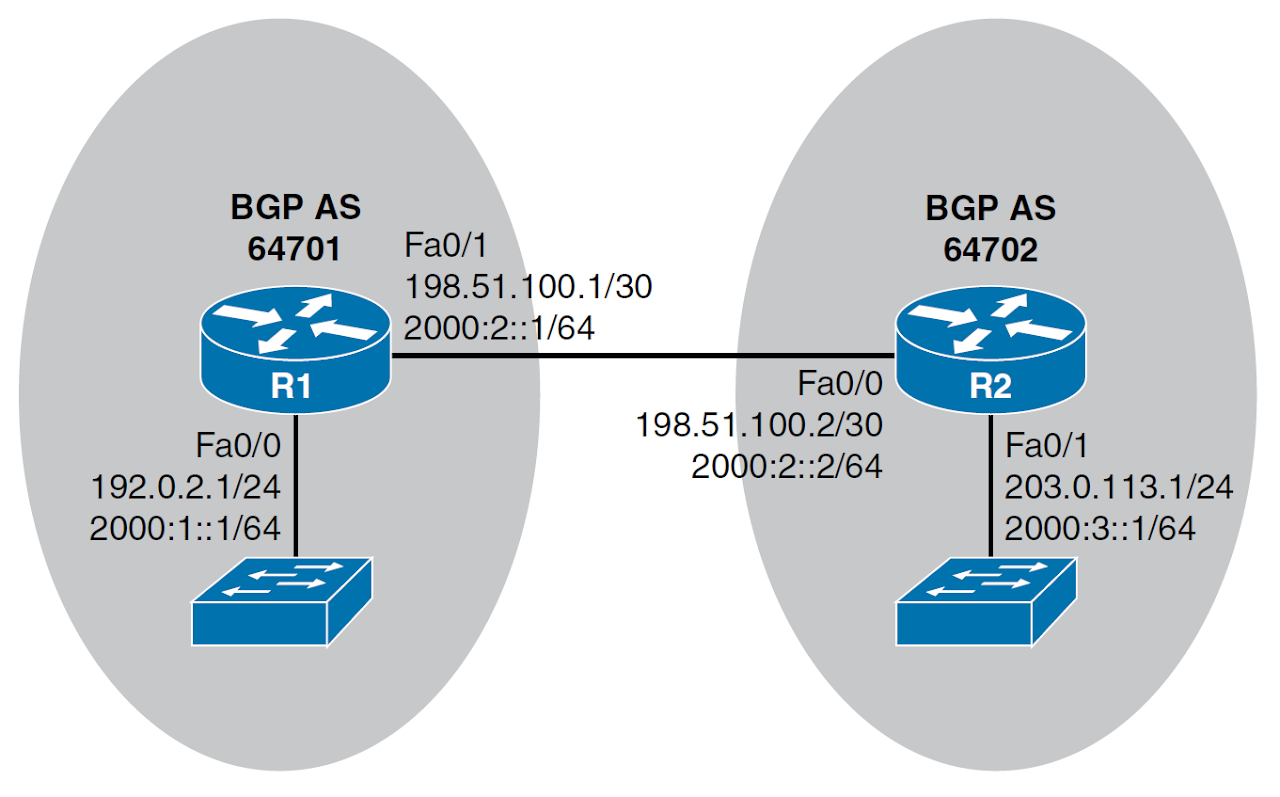
Configure IPv6 Routing over an IPv4 BGP Session Link to heading
Step 1 Link to heading
Create a route map by using the route-map route_map_name command, in global configuration mode.
Step 2 Link to heading
Specify the IPv6 address of next-hop, using the set ipv6 next-hop ipv6_address command, in route map configuration mode.
Step 3 Link to heading
Define an IPv4 BGP neighbor with the neighbor ipv4_address remote-as command, in router configuration mode.
Step 4 Link to heading
Enter address family configuration mode for the IPv4 address family with the address-family ipv4 command, in router configuration mode.
Step 5 Link to heading
Specify which interfaces will participate in the IPv4 address family by issuing network ip4_network_address [ mask subnet_mask ] commands, in IPv4 address family configuration mode. (Note: The neighbor ipv4_address activate command is automatically entered for you in IPv4 address family configuration mode).
Step 6 Link to heading
Enter address family configuration mode for the IPv6 address family with the address-family ipv6 command, in router configuration mode.
Step 7 Link to heading
Specify which interfaces will participate in the IPv6 address family by issuing network ipv6_network_address/prefix_length commands, in IPv6 address family configuration mode.
Step 8 Link to heading
Activate the BGP neighbor for the IPv6 address family with the neighbor ipv4_address activate command, in IPv6 address family configuration mode.
Step 9 Link to heading
Associate the previously configured route map with the neighbor using the neighbor ipv4_address route-map route_map_name out command, in IPv6 address family configuration mode.
hostname R1
int f0/0
    no shut
    ip add 10.1.1.9 255.255.255.0
int s1/0
    no shut
    ip add 10.1.12.1 255.255.255.252
int s1/1
    no shut
    ip add 10.1.14.1 255.255.255.252
    bandwidth 64
router eigrp 100
    no auto-summary
    net 10.1.1.0 0.0.0.255
    net 10.1.12.0 0.0.0.3
    net 10.1.14.0 0.0.0.3
    passive-interface f0/0
hostname R4
int f0/0
    no shut
    ip add 10.1.234.4 255.255.255.0
int s1/0
    no shut
    ip add 10.1.14.2 255.255.255.252
    bandwidth 64
router eigrp 100
    no auto-summary
    net 10.1.234.0 0.0.0.255
    net 10.1.14.0 0.0.0.3
hostname R2
int f0/0
    no shut
    ip add 10.1.234.2 255.255.255.0
int s1/0
    no shut
    ip add 10.1.12.2 255.255.255.252
router eigrp 100
    no auto-summary
    net 10.1.12.0 0.0.0.3
    net 10.1.234.0 0.0.0.255
hostname R3
int f0/0
    no shut
    ip add 10.1.234.3 255.255.255.0
int f0/1
    no shut
    ip add 10.1.3.1 255.255.255.0
router eigrp 100
    no auto-summary
    net 10.1.3.0 0.0.0.255
    net 10.1.234.0 0.0.0.255
    passive-interface f0/1
Verification Link to heading
R1# show ip route eigrp
Codes: D - EIGRP
      10.0.0.0/8 is variably subnetted,
Configure IPv6 Routing over an IPv6 BGP Session Link to heading
Step 1 Link to heading
Define an IPv6 BGP neighbor with the neighbor ipv6_address remote-as command, in router configuration mode.
Step 2 Link to heading
Enter address family configuration mode for the IPv6 address family with the address-family ipv6 command, in router configuration mode.
Step 3 Link to heading
Specify which interfaces will participate in the IPv6 address family by issuing network ipv6_network_address/prefix_length commands, in IPv6 address family configuration mode.
Step 4 Link to heading
Activate the BGP neighbor for the IPv6 address family with the neighbor ipv4_address activate command, in IPv6 address family configuration mode.
Note: does not require the configuration of a route map to specify a next-hop IPv6 address.
hostname R1
int f0/0
    no shut
    ip add 10.1.1.9 255.255.255.0
int s1/0
    no shut
    ip add 10.1.12.1 255.255.255.252
int s1/1
    no shut
    ip add 10.1.14.1 255.255.255.252
    bandwidth 64
router eigrp 100
    no auto-summary
    net 10.1.1.0 0.0.0.255
    net 10.1.12.0 0.0.0.3
    net 10.1.14.0 0.0.0.3
    passive-interface f0/0
hostname R4
int f0/0
    no shut
    ip add 10.1.234.4 255.255.255.0
int s1/0
    no shut
    ip add 10.1.14.2 255.255.255.252
    bandwidth 64
router eigrp 100
    no auto-summary
    net 10.1.234.0 0.0.0.255
    net 10.1.14.0 0.0.0.3
hostname R2
int f0/0
    no shut
    ip add 10.1.234.2 255.255.255.0
int s1/0
    no shut
    ip add 10.1.12.2 255.255.255.252
router eigrp 100
    no auto-summary
    net 10.1.12.0 0.0.0.3
    net 10.1.234.0 0.0.0.255
hostname R3
int f0/0
    no shut
    ip add 10.1.234.3 255.255.255.0
int f0/1
    no shut
    ip add 10.1.3.1 255.255.255.0
router eigrp 100
    no auto-summary
    net 10.1.3.0 0.0.0.255
    net 10.1.234.0 0.0.0.255
    passive-interface f0/1
Verification Link to heading
R1# show ip route eigrp
Codes: D - EIGRP
      10.0.0.0/8 is variably subnetted,