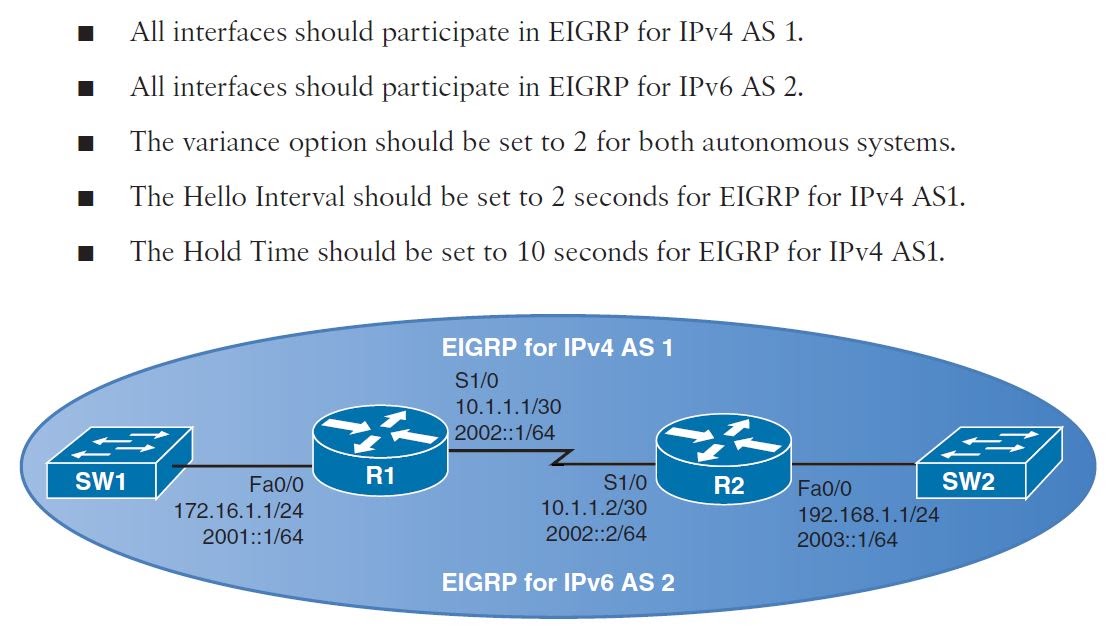
hostname R1

ipv6 unicast-routing

# Step 1: Configure a Named EIGRP virtual instance
router eigrp TEST

# Step 2: Specify an address family along with its autonomous system number
    address-family ipv4 unicast autonomous-system 1

# Step 3: Configure general EIGRP settings (network, eigrp router-id, eigrp stub, metric)
        network 10.1.1.0 0.0.0.3
        network 172.16.1.0 0.0.0.255
        eigrp router-id 1.1.1.1

# Step 4: Enter Address-Family-Interface mode (default | interface-id) to apply changes to interfaces (authentication, bandwidthpercent, hello-interval, hold-time, passive-interface, split-horizon)
        af-interface default
            hello-interval 2
            hold-time 10
            passive-interface

        af-interface Serial1/0
            no passive-interface

# Step 5: Enter Address-Family-Topology mode and configure the topology (autosummary, maximum-paths, redistribute, variance)
        topology base
            variance 2

    address-family ipv6 unicast autonomous-system 2
        af-interface default
            hello-interval 2
            hold-time 10
            passive-interface

        af-interface Serial1/0
            no passive-interface

        topology base
            variance 2
hostname R2

ipv6 unicast-routing

router eigrp TEST
    address-family ipv4 unicast autonomous-system 1
        network 10.1.1.0 0.0.0.3
        network 192.168.1.0 0.0.0.255
        eigrp router-id 2.2.2.2

        af-interface default
            hello-interval 2
            hold-time 10
            passive-interface

        af-interface Serial1/0
            no passive-interface

        topology base
            variance 2

    address-family ipv6 unicast autonomous-system 2
        af-interface default
            hello-interval 2
            hold-time 10
            passive-interface

        af-interface Serial1/0
            no passive-interface

        topology base
            variance 2
R1#show ip protocols
Routing Protocol is "eigrp 4"
  Outgoing update filter list for all interfaces is not set
  Incoming update filter list for all interfaces is not set
  Default networks flagged in outgoing updates
  Default networks accepted from incoming updates
  EIGRP-IPv4 VR(TEST) Address-Family Protocol for AS(4)
    Metric weight K1=1, K2=0, K3=1, K4=0, K5=0 K6=0
    Metric rib-scale 128
    Metric version 64bit
    NSF-aware route hold timer is 240
    Router-ID: 1.1.1.1
    Topology : 0 (base)
      Active Timer: 3 min
      Distance: internal 90 external 170
      Maximum path: 4
      Maximum hopcount 100
      Maximum metric variance 2
      Total Prefix Count: 3
      Total Redist Count: 0
  Automatic Summarization: disabled
  Maximum path: 4
  Routing for Networks:
    10.1.1.0/30
    172.16.1.0/24
  Passive Interface(s):
    FastEthernet0/0
  Routing Information Sources:
    Gateway         Distance      Last Update
    10.1.1.2              90      00:22:30
  Distance: internal 90 external 170

R1#show ipv6 protocols
IPv6 Routing Protocol is "connected"
IPv6 Routing Protocol is "ND"
IPv6 Routing Protocol is "eigrp 2"
EIGRP-IPv6 VR(TEST) Address-Family Protocol for AS(2)
  Metric weight K1=1, K2=0, K3=1, K4=0, K5=0 K6=0
  Metric rib-scale 128
  Metric version 64bit
  NSF-aware route hold timer is 240
  Router-ID: 172.16.1.1
  Topology : 0 (base)
    Active Timer: 3 min
    Distance: internal 90 external 170
    Maximum path: 16
    Maximum hopcount 100
    Maximum metric variance 2
    Total Prefix Count: 3
    Total Redist Count: 0
  Interfaces:
    Serial1/0
    FastEthernet0/0 (passive)
  Redistribution:
    None