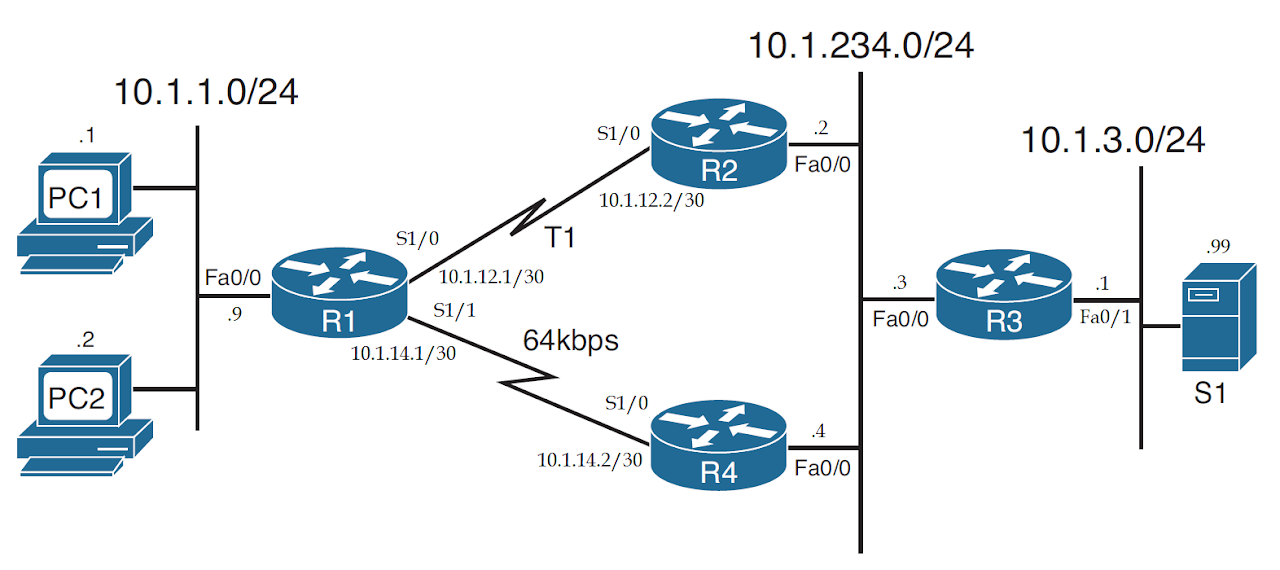
Task 1 Link to heading
- Configure EIGRP on all routers.
- Configure bandwidth on R1-R4 link as 64kbps to let all traffic from 10.1.1.0/24 to 10.1.3.0/24 subnet use R1-R2 link.
Configuration Link to heading
hostname R1
int f0/0
    no shut
    ip add 10.1.1.9 255.255.255.0
int s1/0
    no shut
    ip add 10.1.12.1 255.255.255.252
int s1/1
    no shut
    ip add 10.1.14.1 255.255.255.252
    bandwidth 64
router eigrp 100
    no auto-summary
    net 10.1.1.0 0.0.0.255
    net 10.1.12.0 0.0.0.3
    net 10.1.14.0 0.0.0.3
    passive-interface f0/0
hostname R2
int f0/0
    no shut
    ip add 10.1.234.2 255.255.255.0
int s1/0
    no shut
    ip add 10.1.12.2 255.255.255.252
router eigrp 100
    no auto-summary
    net 10.1.12.0 0.0.0.3
    net 10.1.234.0 0.0.0.255
hostname R3
int f0/0
    no shut
    ip add 10.1.234.3 255.255.255.0
int f0/1
    no shut
    ip add 10.1.3.1 255.255.255.0
router eigrp 100
    no auto-summary
    net 10.1.3.0 0.0.0.255
    net 10.1.234.0 0.0.0.255
    passive-interface f0/1
hostname R4
int f0/0
    no shut
    ip add 10.1.234.4 255.255.255.0
int s1/0
    no shut
    ip add 10.1.14.2 255.255.255.252
    bandwidth 64
router eigrp 100
    no auto-summary
    net 10.1.234.0 0.0.0.255
    net 10.1.14.0 0.0.0.3
Verification Link to heading
R1# show ip route eigrp
Codes: D - EIGRP
      10.0.0.0/8 is variably subnetted, 8 subnets, 3 masks
D        10.1.3.0/24 [90/2174976] via 10.1.12.2, 00:00:15, Serial1/0
D        10.1.234.0/24 [90/2172416] via 10.1.12.2, 00:00:26, Serial1/0

R1# show ip eigrp topology
EIGRP-IPv4 Topology Table for AS(100)/ID(10.1.14.1)
Codes: P - Passive
P 10.1.12.0/30, 1 successors, FD is 2169856
        via Connected, Serial1/0
P 10.1.234.0/24, 1 successors, FD is 2172416
        via 10.1.12.2 (2172416/28160), Serial1/0
        via 10.1.14.2 (40514560/28160), Serial1/1
P 10.1.14.0/30, 1 successors, FD is 40512000
        via Connected, Serial1/1
P 10.1.3.0/24, 1 successors, FD is 2174976
        via 10.1.12.2 (2174976/30720), Serial1/0
        via 10.1.14.2 (40517120/30720), Serial1/1
P 10.1.1.0/24, 1 successors, FD is 28160
        via Connected, FastEthernet0/0
PC2# trace 10.1.3.99
Tracing the route to 10.1.3.99
VRF info: (vrf in name/id, vrf out name/id)
  1 10.1.1.9 72 msec 72 msec 16 msec
  2 10.1.12.2 48 msec 36 msec 20 msec
  3 10.1.234.3 52 msec 56 msec 48 msec
  4 10.1.3.99 132 msec 40 msec 24 msec
Task 2 Link to heading
Configure PBR on R1 to routes packets from PC2 to network 10.1.3.0/24 on lower-bandwidth R1-R4 link, instead of R1-R2 link.
Configuration Link to heading
R1(config)#
access-list 101 permit ip host 10.1.1.2 10.1.3.0 0.0.0.255
route-map PC2-over-R4 permit
    match ip address 101
    set ip next-hop 10.1.14.2
int f0/0
    ip policy route-map PC2-over-R4
Verification Link to heading
PC2# trace 10.1.3.99
Tracing the route to 10.1.3.99
VRF info: (vrf in name/id, vrf out name/id)
  1 10.1.1.9 96 msec 76 msec 32 msec
  2 10.1.14.2 52 msec 36 msec 36 msec
  3 10.1.234.3 60 msec 44 msec 16 msec
  4 10.1.3.99 68 msec 52 msec 64 msec
R1# show ip policy
Interface      Route map
Fa0/0          PC2-over-R4

R1# debug ip policy
*Dec 27 20:20:57.839: IP: s=10.1.1.2 (FastEthernet0/0), d=10.1.3.99, len 28, policy match
*Dec 27 20:20:57.843: IP: route map PC2-over-R4, item 10, permit
*Dec 27 20:20:57.843: IP: s=10.1.1.2 (FastEthernet0/0), d=10.1.3.99 (Serial1/1), len 28, policy routed
*Dec 27 20:20:57.847: IP: FastEthernet0/0 to Serial1/1 10.1.14.2
Task 3 Link to heading
Configure an ICMP-based IP SLA Operation on R1 to send ICMP packets to S1 frequently.
- Step 1: Create the IP SLA operation and assign it an integer operation number, using the ip sla sla-ops-number global configuration command.
- Step 2: Define the operation type and the parameters for that operation type. For ICMP echo, you define the destination IP address or host name, and optionally, the source IP address or host name, using the
icmp-echo { destination-ipaddress | destination-hostname } [ source-ip { ip-address | hostname } | source-interface interface-name ]SLA operation subcommand. - Step 3: (Optional) Define a (nondefault) frequency at which the operation should send the packets, in seconds, using the
frequency secondsIP SLA subcommand. - Step 4: Schedule when the SLA will run, using the
ip sla schedule sla-ops-number [ life { forever | seconds }] [ start-time { hh : mm [ : ss ] [ month day | day month ] | pending | now | after hh : mm : ss }] [ ageout seconds ] [ recurring ]global command.
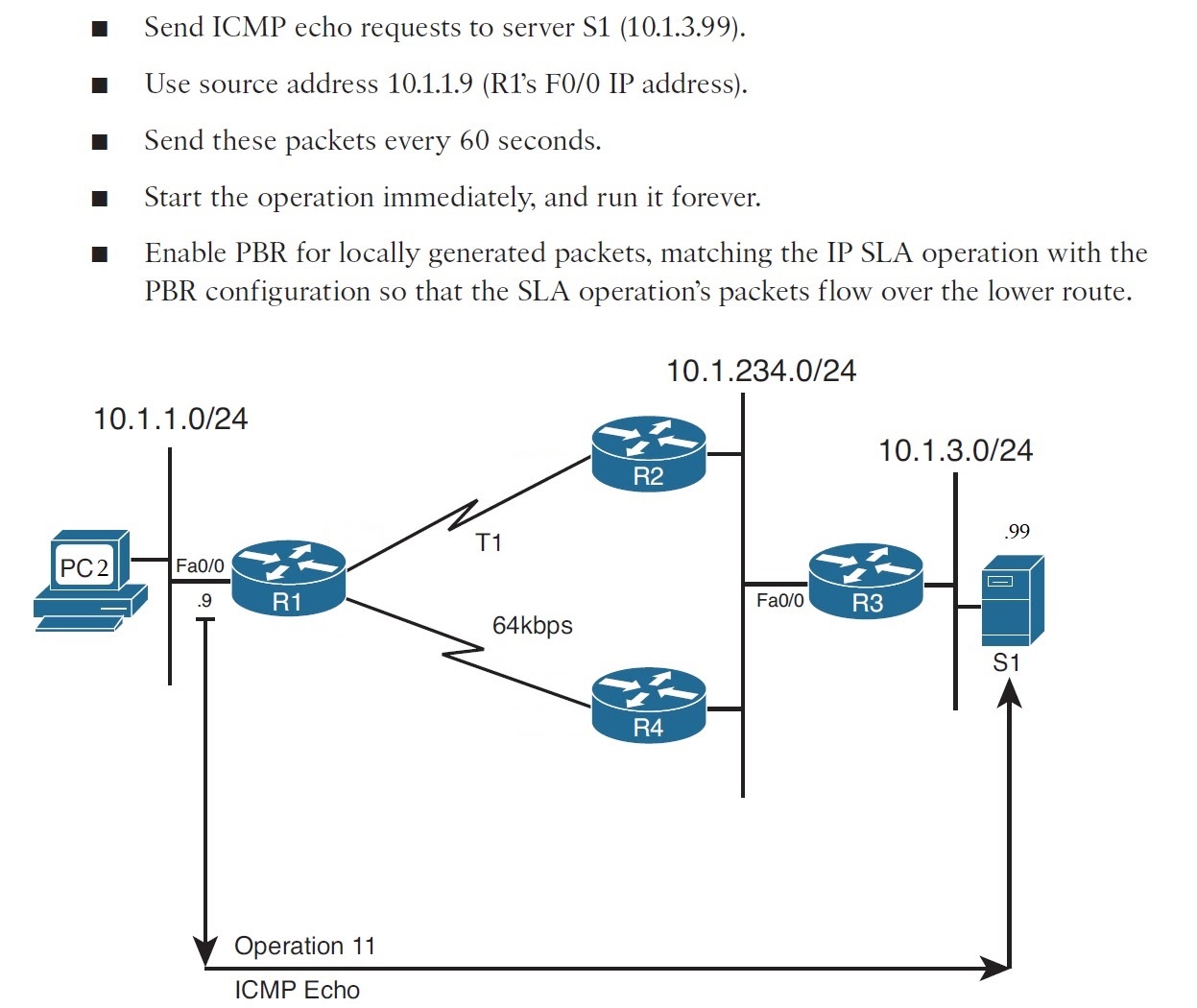
Configuration Link to heading
R1(config)#
# (Optional) Routes packet to lower-bandwidth R1-R4 link
access-list 101 permit ip host 10.1.1.9 host 10.1.3.99
ip local policy route-map PC2-over-R4
ip sla 11
    icmp-echo 10.1.3.99 source-ip 10.1.1.9
    frequency 60
ip sla schedule 11 life forever start-time now
Verification Link to heading
S1# debug ip icmp
*Dec 27 20:32:56.659: ICMP: echo reply sent, src 10.1.3.99, dst 10.1.1.9, topology BASE, dscp 0 topoid 0
R1# debug ip icmp
*Dec 27 20:34:57.287: ICMP: echo reply rcvd, src 10.1.3.99, dst 10.1.1.9, topology BASE, dscp 0 topoid 0

R1# show ip sla statistics
IPSLAs Latest Operation Statistics
IPSLA operation id: 11
        Latest RTT: 16 milliseconds
Latest operation start time: 20:34:57 UTC Wed Dec 27 2017
Latest operation return code: OK
Number of successes: 5
Number of failures: 0
Operation time to live: Forever
Task 4 Link to heading
Configure a Static Route on R1 with Tracking IP SLA to S1. All traffic are routed by the static route via R4.
- Step 1: Use the
track object-number ip sla sla-ops-number [ state | reachability ]global command. - Step 2: (Optional) Configure the delay to regulate flapping of the tracking state by using the
delay { down seconds | up seconds }command in tracking configuration mode. - Step 3: Configure the static route with the
ip route destination mask { interface | next-hop } track object-numbercommand in global configuration mode.
Configuration Link to heading
R1(config)#
track 1 ip sla 11 state
    delay up 90 down 90
ip route 10.1.3.0 255.255.255.0 10.1.14.2 track 1
Verification Link to heading
R1# show ip route static
Codes: S - static
      10.0.0.0/8 is variably subnetted, 8 subnets, 3 masks
S        10.1.3.0/24 [1/0] via 10.1.14.2

R1# show track
Track 1
  IP SLA 11 state
  State is Up
    1 change, last change 00:01:25
  Delay up 90 secs, down 90 secs
  Latest operation return code: OK
  Latest RTT (millisecs) 64
  Tracked by:
    STATIC-IP-ROUTING 0
Test connection by deleting the link between R4 and 10.1.234.0/24 network
R1# show track
Track 1
  IP SLA 11 state
  State is Up, delayed Down (76 secs remaining)
    1 change, last change 00:04:08
  Delay up 90 secs, down 90 secs
  Latest operation return code: OK
  Latest RTT (millisecs) 76
  Tracked by:
    STATIC-IP-ROUTING 0
*Dec 27 21:00:28.619: %TRACKING-5-STATE: 1 ip sla 11 state Up->Down

R1# show track
Track 1
  IP SLA 11 state
  State is Down
    2 changes, last change 00:00:07
  Delay up 90 secs, down 90 secs
  Latest operation return code: Timeout
  Tracked by:
    STATIC-IP-ROUTING 0

# The static route is deleted because of fail tracking
R1# show ip route eigrp
Codes: D - EIGRP
      10.0.0.0/8 is variably subnetted, 8 subnets, 3 masks
D        10.1.3.0/24 [90/2174976] via 10.1.12.2, 00:00:39, Serial1/0
D        10.1.234.0/24 [90/2172416] via 10.1.12.2, 00:53:43, Serial1/0