Reference: Link to heading
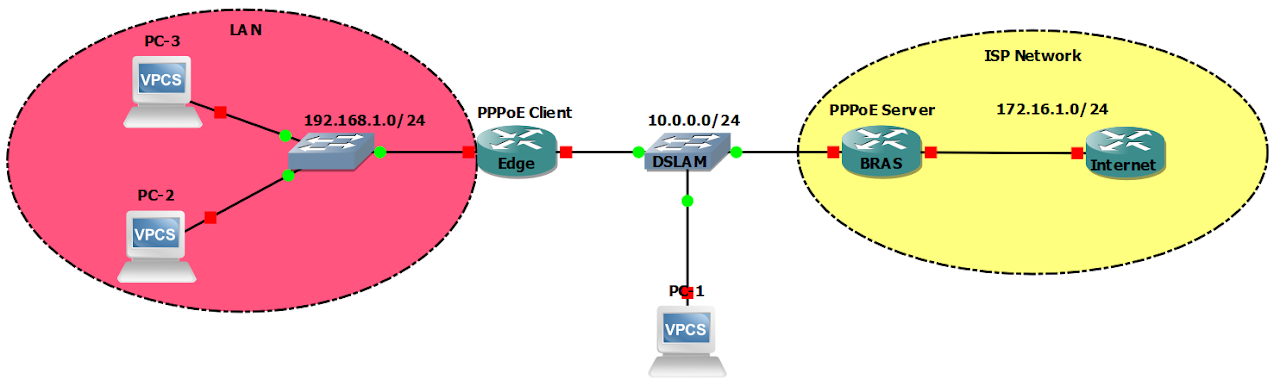
Configuration Link to heading
hostname Edge
int g0/0
    ip add 192.168.1.1 255.255.255.0
    no shut
int dialer 1
    ip add negotiated
    mtu 1492
    ip tcp adjust-mss 1452
    encap ppp
    dialer pool 1
    ppp ipcp route default
int g0/1
    no ip add
    pppoe enable group global
    pppoe-client dial-pool-number 1
    no shut
hostname BRAS
int g0/0
    ip add 172.16.1.1 255.255.255.0
    no shut

# Option 1: Local DHCP
int virtual-template 1
    ip add 10.0.0.1 255.255.255.0
    peer default ip add dhcp-pool USERS
bba-group pppoe MYGROUP
    virtual-template 1
    sessions per-mac limit 10
int g0/1
    no ip add
    pppoe enable group MYGROUP
ip dhcp pool USERS
    network 10.0.0.0 255.255.255.0
    default 10.0.0.1
ip dhcp exclude 10.0.0.1 10.0.0.10

# Option 2: Remote DHCP
int virtual-template 1
    ip add 10.0.0.1 255.255.255.0
    peer default ip add dhcp
bba-group pppoe MYGROUP
    virtual-template 1
    sessions per-mac limit 10
int g0/1
    no ip add
    pppoe enable group MYGROUP
ip address-pool dhcp-proxy-client
ip dhcp-server 172.16.1.10
# Used only for Option 2: Remote DHCP
hostname Internet
int g0/0
ip add 172.16.1.10 255.255.255.0
    no shut
ip http server
ip route 0.0.0.0 0.0.0.0 172.16.1.1
ip dhcp pool USERS
    network 10.0.0.0 255.255.255.0
    default 10.0.0.1
ip dhcp exclude 10.0.0.1 10.0.0.10
Verification Link to heading
Set SPAN on 2 switches to capture TCP connections to see MSS value before and after they enter Egde Router.
=> MSS from PC is 1460 bytes (default). But Edge Router changes it to 1452 bytes.