To configure a Cisco router as a Frame Relay switch, follow the configuration steps listed below:
- Step 1: Enable Frame Relay switching on the router using the command
frame-relay switchingin the global configuration mode. - Step 2: Configure the interface as a DCE interface with the
frame-relay intf-type dceinterface configuration command. - Step 3: The
clockratecommand is required on the serial interface of the Frame Relay switch (attached with the DCE end of the serial cable). It provides clocking signals to the connected Frame Relay routers, which are set up as DTE devices. - Step 4: Route an incoming DLCI to a corresponding outgoing DLCI by command
connect <WORD> <incoming int> <incoming DLCI> <outcoming int> <outcoming DLCI>
no ip split-horizon eigrp 1 command to disable Split Horizon, which allows Hub receiving and advertising routes from Spokes on the same interface.
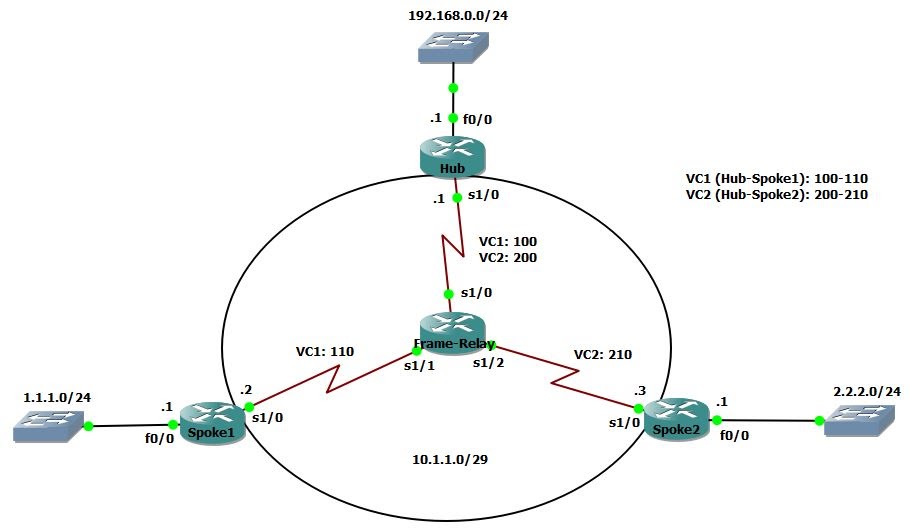
Configuration Link to heading
hostname Frame-Relay
frame-relay switching
int s1/0
    no shut
    encapsulation frame-relay
    frame-relay intf-type dce
    clockrate 64000
int s1/1
    no shut
    encapsulation frame-relay
    frame-relay intf-type dce
    clockrate 64000
int s1/2
    no shut
    encapsulation frame-relay
    frame-relay intf-type dce
    clockrate 64000
connect Hub-Spoke1 s1/0 100 s1/1 110
connect Hub-Spoke2 s1/0 200 s1/2 210
hostname Hub
int f0/0
    no shut
    ip add 192.168.0.1 255.255.255.0
int s1/0
    no shut
    encapsulation frame-relay
int s1/0.1 multipoint
    ip address 10.1.1.1 255.255.255.248
    no ip split-horizon eigrp 1
    frame-relay map ip 10.1.1.2 100 broadcast
    frame-relay map ip 10.1.1.3 200 broadcast
router eigrp 1
    net 10.0.0.0
    net 192.168.0.0
hostname Spoke1
int f0/0
    no shut
    ip add 1.1.1.1 255.255.255.0
int s1/0
    no shut
    encapsulation frame-relay
    ip address 10.1.1.2 255.255.255.248
    frame-relay map ip 10.1.1.1 110 broadcast
router eigrp 1
    net 10.0.0.0
    net 1.1.1.0 0.0.0.255
hostname Spoke2
int f0/0
    no shut
    ip add 2.2.2.1 255.255.255.0
int s1/0
    no shut
    encapsulation frame-relay
    ip address 10.1.1.3 255.255.255.248
    frame-relay map ip 10.1.1.1 210 broadcast
router eigrp 1
    net 10.0.0.0
    net 2.2.2.0 0.0.0.255
Verification Link to heading
Hub# show frame-relay map
Serial1/0.1 (up): ip 10.1.1.2 dlci 100(0x64,0x1840), dynamic,
              broadcast,, status defined, active
Serial1/0.1 (up): ip 10.1.1.3 dlci 200(0xC8,0x3080), dynamic,
              broadcast,, status defined, active
Spoke2# show ip route
      1.0.0.0/24 is subnetted, 1 subnets
D        1.1.1.0 [90/2684416] via 10.1.1.1, 00:23:50, Serial1/0
      2.0.0.0/8 is variably subnetted, 2 subnets, 2 masks
C        2.2.2.0/24 is directly connected, FastEthernet0/0
L        2.2.2.1/32 is directly connected, FastEthernet0/0
      10.0.0.0/8 is variably subnetted, 2 subnets, 2 masks
C        10.1.1.0/29 is directly connected, Serial1/0
L        10.1.1.3/32 is directly connected, Serial1/0
D     192.168.0.0/24 [90/2172416] via 10.1.1.1, 00:23:50, Serial1/0