Jenkins Job Builder is a Python library which takes descriptions of jobs in YAML or JSON format and uses them to configure Jenkins jobs. In fancy words, it helps to implement Jenkins job configs as Code.
In this demo, we will launch Jenkins inside a Docker container and use Jenkins Job Builder to configure its jobs. Our working directory looks like this:
.
├── Dockerfile
├── default-user.groovy
├── jenkins_jobs.ini
├── job-configs
│   ├── folders.yml
│   └── tools
│       └── dummy_job.yml
└── plugins.txt

2 directories, 6 files
1. Build Jenkins Docker image Link to heading
From the official LTS Jenkins Docker image, we will build a custom Docker image used for this demo. The Dockerfile looks like the following:
FROM jenkins/jenkins:lts-jdk11

USER root
RUN mkdir /var/log/jenkins \
    && mkdir /var/cache/jenkins \
    && chown -R jenkins:jenkins /var/log/jenkins \
    && chown -R jenkins:jenkins /var/cache/jenkins
RUN apt-get update \
    && rm -rf /var/lib/apt/lists/* \
    && rm -rf /root/.cache

USER jenkins
ENV JAVA_OPTS="-Djenkins.install.runSetupWizard=false"
COPY default-user.groovy /usr/share/jenkins/ref/init.groovy.d/
COPY plugins.txt /tmp/plugins.txt
RUN jenkins-plugin-cli --plugin-file /tmp/plugins.txt

EXPOSE 8080
In this custom image, we skip the initial set up wizard. We also create a default admin user by copying the default-user.groovy script to /usr/share/jenkins/ref/init.groovy.d/ directory so that Jenkins will run it at startup. Default password is set to password in the script
import jenkins.*
import hudson.*
import com.cloudbees.plugins.credentials.*
import com.cloudbees.plugins.credentials.common.*
import com.cloudbees.plugins.credentials.domains.*
import com.cloudbees.jenkins.plugins.sshcredentials.impl.*
import hudson.plugins.sshslaves.*;
import hudson.model.*
import jenkins.model.*
import hudson.security.*

global_domain = Domain.global()
credentials_store = Jenkins.instance.getExtensionList(
    'com.cloudbees.plugins.credentials.SystemCredentialsProvider'
)[0].getStore()

credentials = new BasicSSHUserPrivateKey(
    CredentialsScope.GLOBAL,
    null,
    "root",
    new BasicSSHUserPrivateKey.UsersPrivateKeySource(),
    "",
    ""
)

credentials_store.addCredentials(global_domain, credentials)

def hudsonRealm = new HudsonPrivateSecurityRealm(false)
def adminUsername = System.getenv('JENKINS_ADMIN_USERNAME') ?: 'admin'
def adminPassword = System.getenv('JENKINS_ADMIN_PASSWORD') ?: 'password'
hudsonRealm.createAccount(adminUsername, adminPassword)

def instance = Jenkins.getInstance()
instance.setSecurityRealm(hudsonRealm)
instance.save()
We also install all needed plugins specified in plugin.txt. If you use the GUI to install plugins, there are only 2 plugins to install and they will bring all their dependencies:
ace-editor:1.1
apache-httpcomponents-client-4-api:4.5.13-138.v4e7d9a_7b_a_e61
bouncycastle-api:2.26
branch-api:2.1051.v9985666b_f6cc
caffeine-api:2.9.3-65.v6a_47d0f4d1fe
cloudbees-folder:6.800.v71307ca_b_986b
command-launcher:90.v669d7ccb_7c31
credentials-binding:523.vd859a_4b_122e6
credentials:1214.v1de940103927
display-url-api:2.3.7
durable-task:503.v57154d18d478
git-client:3.13.1
instance-identity:142.v04572ca_5b_265
ionicons-api:31.v4757b_6987003
jackson2-api:2.14.1-313.v504cdd45c18b
jakarta-activation-api:2.0.1-2
jakarta-mail-api:2.0.1-2
javax-activation-api:1.2.0-5
javax-mail-api:1.6.2-8
jaxb:2.3.7-1
jdk-tool:63.v62d2fd4b_4793
jsch:0.1.55.61.va_e9ee26616e7
mailer:438.v02c7f0a_12fa_4
mina-sshd-api-common:2.9.2-50.va_0e1f42659a_a
mina-sshd-api-core:2.9.2-50.va_0e1f42659a_a
pipeline-build-step:2.18
pipeline-groovy-lib:621.vb_44ce045b_582
pipeline-input-step:466.v6d0a_5df34f81
pipeline-milestone-step:101.vd572fef9d926
pipeline-model-api:2.2118.v31fd5b_9944b_5
pipeline-model-definition:2.2118.v31fd5b_9944b_5
pipeline-model-extensions:2.2118.v31fd5b_9944b_5
pipeline-stage-step:296.v5f6908f017a_5
pipeline-stage-tags-metadata:2.2118.v31fd5b_9944b_5
plain-credentials:139.ved2b_9cf7587b
scm-api:621.vda_a_b_055e58f7
script-security:1228.vd93135a_2fb_25
snakeyaml-api:1.33-90.v80dcb_3814d35
ssh-credentials:305.v8f4381501156
sshd:3.275.v9e17c10f2571
structs:324.va_f5d6774f3a_d
trilead-api:2.84.v72119de229b_7
validating-string-parameter:2.8
variant:59.vf075fe829ccb
workflow-aggregator:590.v6a_d052e5a_a_b_5
workflow-api:1200.v8005c684b_a_c6
workflow-basic-steps:994.vd57e3ca_46d24
workflow-cps:3581.v2b_e4c99c76ed
workflow-durable-task-step:1217.v38306d8fa_b_5c
workflow-job:1254.v3f64639b_11dd
workflow-multibranch:716.vc692a_e52371b_
workflow-scm-step:400.v6b_89a_1317c9a_
workflow-step-api:639.v6eca_cd8c04a_a_
workflow-support:839.v35e2736cfd5c
Build the custom Jenkins Docker image
$ docker build . -t jenkins:custom
2. Run Jenkins in a container Link to heading
Create a jenkins_home Docker volume to keep the data persistance
$ docker volume create jenkins_home
Run Jenkins Docker container using the custom image
$ docker run -p 8080:8080 --restart=on-failure \
    -v jenkins_home:/var/jenkins_home jenkins:custom
Login to http://localhost:8080 using the default admin user to make sure Jenkins UI load properly
3. Install Jenkins Job Builder Link to heading
Create a Python virtual environment and install Jenkins Job Builder
$ virtualenv .venv
$ source .venv/bin/activate
$ pip install jenkins-job-builder==4.1.0
jenkins_jobs.ini
[job_builder]
ignore_cache=True
keep_descriptions=False
recursive=True
allow_duplicates=False
allow_empty_variables=True

[staging]
query_plugins_info=True
url=http://localhost:8080

[prod]
query_plugins_info=True
url=http://localhost:8888

[__future__]
param_order_from_yaml=True
Note that we specify 2 different Jenkins host staging and prod.
4. Configure job configs Link to heading
folders.yml contains folder definitions
- job:
    name: tools
    project-type: folder
    health-metrics:
    - worst-child-health-metric
dummy_job.yml contains job definitions
- job:
    name: tools/dummy-job
    concurrent: true
    project-type: pipeline
    properties:
    - build-discarder:
        days-to-keep: 14
    parameters:
    - validating-string:
        name: validating_param
        default: ''
        description: Validating parameter of the dummy job
        regex: '^\S{3,}$'
        msg: Please specify at least 3 characters
    - choice:
        name: choice_param
        choices:
        - a
        - b
        - c
        description: Choice parameter of the dummy job
    - string:
        name: string_param
        default: ''
        description: String parameter of the dummy job
        trim: true
    - bool:
        name: bool_param
        default: true
        description: Boolean parameter of the dummy job
    sandbox: true
    dsl: |
      #!groovy

      echo "${validating_param}"
      echo "${choice_param}"
      echo "${string_param}"
      echo "${bool_param}"
5. Test and apply job configs Link to heading
Test all job configs specified in job-configs directory to staging server to make sure syntax is correct
jenkins-jobs --conf jenkins_jobs.ini \
    --server staging \
    --user admin \
    --password password \
    test job-configs
When everything looks good, launch the job configs
jenkins-jobs --conf jenkins_jobs.ini \
    --server staging \
    --user admin \
    --password password \
    update job-configs
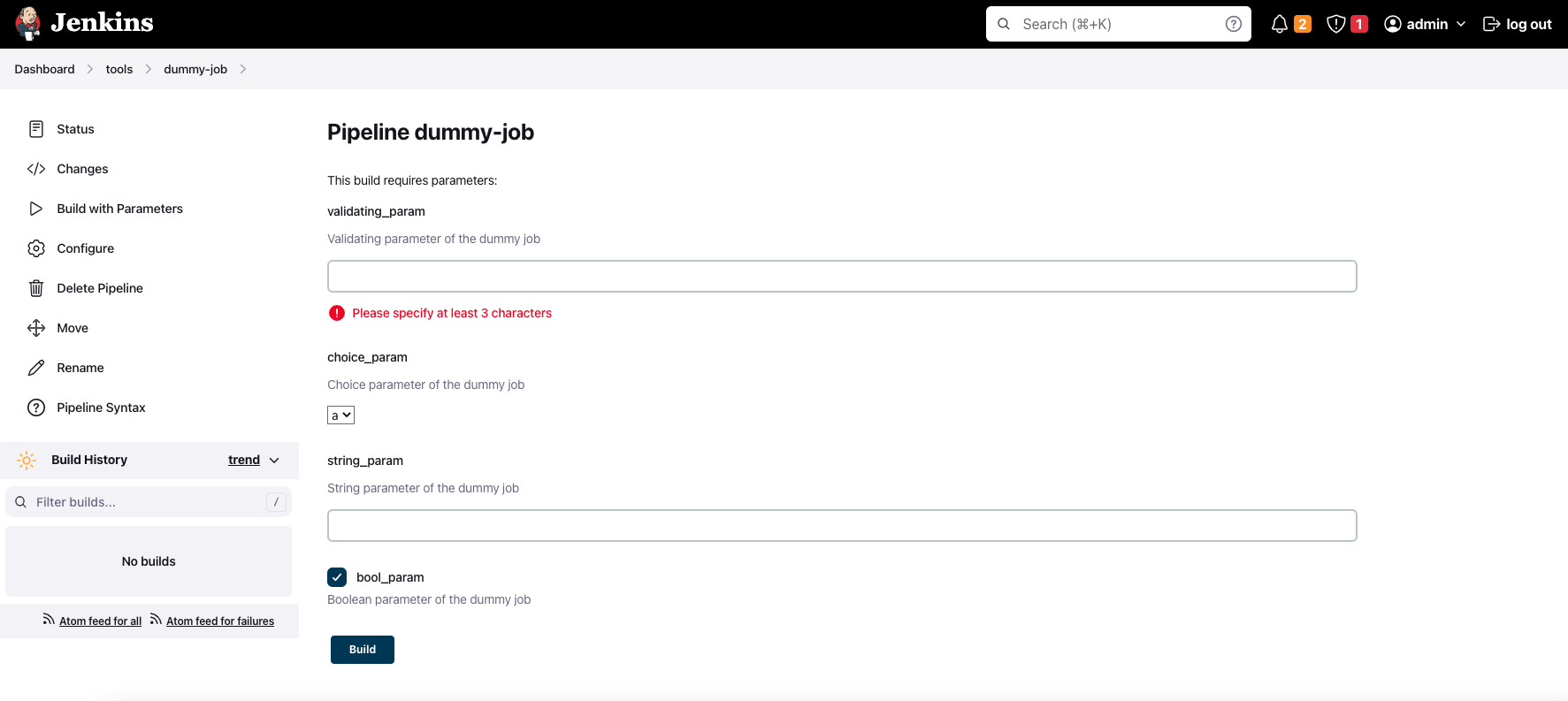
We can see tools/dummy-job is created with build parameters in the UI