DMVPN using mGRE over IPSec Link to heading
Overview Link to heading
The Dynamic Multipoint VPN (DMVPN) feature allows users to scale IPSec VPNs by combining Generic Routing Encapsulation (GRE) tunnels, IPSec encryption, and Next Hop Resolution Protocol (NHRP).
DMVPN works according to the following rules: Each spoke has a permanent IPSec tunnel to the hub, not to the other spokes.
- When a spoke needs to send a packet to a private network on another spoke, it queries the NHRP server for the public address of the destination spoke.
- After having the public address, it can initiate a dynamic IPSec tunnel to the target spoke.
- The spoke-to-spoke tunnel is built over the multipoint GRE (mGRE) interface.
- When the spoke-to-spoke tunnel is established, packets use the tunnel instead of the spoke-to-hub tunnel.
Definition Link to heading
- NHRP: A client and server protocol where the hub is the server and the spokes are the clients. The hub maintains an NHRP database of the public addresses of the each spoke.
- mGRE Tunnel Interface: Allows a single GRE interface to support multiple IPSec tunnels and simplifies the size and complexity of the configuration.
Note:
- After a amount of inactivity on the spoke-to-spoke tunnels, the router will tear down those tunnels to save resources (IPSec security associations [SA]).
- The traffic profile should follow the 80-20% rule: 80% is spoke-to-hub traffic, and 20% is spoke-to-spoke traffic.
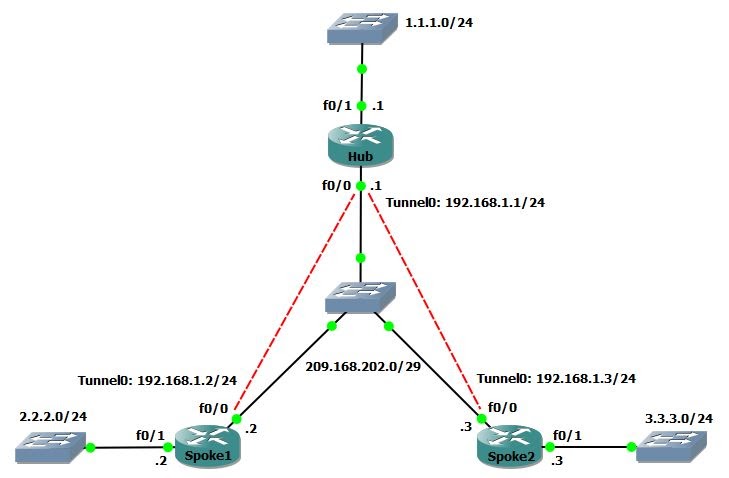
Task 1 Link to heading
Configure mGRE and NHRP for basic DMVPN
Configuration Link to heading
- In mGRE, we do not need to specify a tunnel destination.
- In spoke’s tunnel, there must be a map between NHRP Server address and NBMA address.
hostname Hub
int f0/0
    ip address 209.168.202.1 255.255.255.248
    no shut
int f0/1
    ip address 1.1.1.1 255.255.255.0
    no shut
int tunnel 0
    ip address 192.168.1.1 255.255.255.0
    tunnel source f0/0
    tunnel mode gre multipoint
    ip nhrp network-id 1
hostname Spoke1
int f0/0
    ip address 209.168.202.2 255.255.255.248
    no shut
int f0/1
    ip address 2.2.2.2 255.255.255.0
    no shut
int tunnel 0
    ip address 192.168.1.2 255.255.255.0
    tunnel source f0/0
    tunnel mode gre multipoint
    ip nhrp nhs 192.168.1.1
    ip nhrp map 192.168.1.1 209.168.202.1
    ip nhrp network-id 1
hostname Spoke2
int f0/0
    ip address 209.168.202.3 255.255.255.248
    no shut
int f0/1
    ip address 3.3.3.3 255.255.255.0
    no shut
int tunnel 0
    ip address 192.168.1.3 255.255.255.0
    tunnel source f0/0
    tunnel mode gre multipoint
    ip nhrp nhs 192.168.1.1
    ip nhrp map 192.168.1.1 209.168.202.1
    ip nhrp network-id 1
Task 2 Link to heading
Configure authentication for NHRP and tunnel key between Hub and Spokes.
Configuration Link to heading
Hub/Spoke1/Spoke2(config)#
int tunnel 0
    ip nhrp authentication CISCO123
    tunnel key 0
Task 3 Link to heading
- Configure DMVPN to allow multicast
- Then configure EIGRP to form neighbor between Hub and Spokes via tunnels.
Configuration Link to heading
- By default, DMVPN allows only unicast => enable multicast by mapping to the NBMA address of Hub.
- Disable split-horizon on Hub to allow Spokes learn routes of each other.
- Using the command
no ip next-hop-self eigrp 100to not modify the next-hop value of EIGRP routes on Hub => allow Spokes send packets directly to each other.
Hub(config)#
int tunnel 0
    ip nhrp map multicast dynamic
    no ip split-horizon eigrp 100
    no ip next-hop-self eigrp 100
router eigrp 100
    no auto
    network 1.1.1.0 0.0.0.255
    network 192.168.1.0 0.0.0.255
Spoke1(config)#
int tunnel 0
    ip nhrp map multicast 209.168.202.1
router eigrp 100
    no auto
    network 2.2.2.0 0.0.0.255
    network 192.168.1.0 0.0.0.255
Spoke2(config)#
int tunnel 0
    ip nhrp map multicast 209.168.202.1
router eigrp 100
    no auto
    network 3.3.3.0 0.0.0.255
    network 192.168.1.0 0.0.0.255
Verification Link to heading
Hub# show ip eigrp nei
EIGRP-IPv4 Neighbors for AS(100)
H   Address                 Interface              Hold Uptime   SRTT   RTO  Q  Seq
                                                   (sec)         (ms)       Cnt Num
1   192.168.1.3             Tu0                      13 00:00:41   61  1512  0  4
0   192.168.1.2             Tu0                      13 00:01:03   70  1512  0  3

Spoke1# show ip route eigrp
      1.0.0.0/24 is subnetted, 1 subnets
D        1.1.1.0 [90/27008000] via 192.168.1.1, 00:00:17, Tunnel0
      3.0.0.0/24 is subnetted, 1 subnets
D        3.3.3.0 [90/28288000] via 192.168.1.3, 00:00:17, Tunnel0
Task 4 Link to heading
No EIGRP, configure OSPF to form neighbor between Hub and Spokes via tunnels.
Configuration Link to heading
By default, when OSPF is enabled, the network type of tunnel interface is point-to-point.
=> Change it to point-to-multipoint or broadcast, if not the OPSF will be flapping.
=> Broadcast is more preferable than point-to-multipoint. Because OSPF does not support next-hop-self command, with broadcast, the next hop will be redirected to other Spokes instead of Hub.
Hub# show ip ospf int tun 0
Tunnel0 is administratively down, line protocol is down
  Internet Address 192.168.1.0/24, Area 0, Attached via Interface Enable
  Process ID 100, Router ID 1.1.1.1, Network Type POINT_TO_POINT, Cost: 1000
  Topology-MTID    Cost    Disabled    Shutdown      Topology Name
        0           1000      no          no            Base
  Enabled by interface config, including secondary ip addresses
  Transmit Delay is 1 sec, State DOWN
  Timer intervals configured, Hello 10, Dead 40, Wait 40, Retransmit 5
    oob-resync timeout 40
Configuration Link to heading
Hub(config)#
no router eigrp 100
router ospf 1
int f0/1
    ip ospf 1 area 0
int tunnel 0
    ip ospf 1 area 0
    ip ospf network broadcast
Spoke1(config)#
no router eigrp 100
router ospf 1
int f0/1
    ip ospf 1 area 0
int tunnel 0
    ip ospf 1 area 0
    ip ospf network broadcast
    ip ospf priority 0
Spoke2(config)#
no router eigrp 100
router ospf 1
int f0/1
    ip ospf 1 area 0
int tunnel 0
    ip ospf 1 area 0
    ip ospf network broadcast
    ip ospf priority 0
Task 5 Link to heading
Configure IP Sec for DMVPN
Configuration Link to heading
Hub(config)#
# Create an ISAKMP policy for Phase 1 negotiations
crypto isakmp policy 10
    hash md5
    authentication pre-share
# Add dynamic pre-shared keys for all the remote VPN routers
crypto isakmp key CISCO123 address 0.0.0.0 0.0.0.0
# Create the Phase 2 policy for actual data encryption
crypto ipsec transform-set strong esp-3des esp-md5-hmac
# Create an IPSec profile to be applied dynamically to the GRE over IPSec tunnels
crypto ipsec profile DMVPN
    set security-association lifetime seconds 900
    set transform-set strong
int tunnel 0
    ip mtu 1440
    tunnel protection ipsec profile DMVPN
Spoke1(config)#
crypto isakmp policy 10
    hash md5
    authentication pre-share
crypto isakmp key CISCO123 address 0.0.0.0 0.0.0.0
crypto ipsec transform-set strong esp-3des esp-md5-hmac
crypto ipsec profile DMVPN
    set security-association lifetime seconds 900
    set transform-set strong
int tunnel 0
    ip mtu 1440
    tunnel protection ipsec profile DMVPN
Spoke2(config)#
crypto isakmp policy 10
    hash md5
    authentication pre-share
crypto isakmp key CISCO123 address 0.0.0.0 0.0.0.0
crypto ipsec transform-set strong esp-3des esp-md5-hmac
crypto ipsec profile DMVPN
    set security-association lifetime seconds 900
    set transform-set strong
int tunnel 0
    ip mtu 1440
    tunnel protection ipsec profile DMVPN
Verification Link to heading
- show crypto engine connection active: Display the total encrypts and decrypts per SA.
- show crypto ipsec sa: Display the stats on the active tunnels.
- show crypto isakmp sa: Display the state for the the ISAKMP SA.
Debug Link to heading
- debug nhrp: Enable NHRP debugging
- debug nhrp packet: Display a dump of NHRP packets.
- debug crypto ipsec: Display IPSec events.
- debug crypto isakmp: Display messages about Internet Key Exchange (IKE) events.
- debug crypto engine: Display information from the crypto engine.
Future read Link to heading
DMVPN over IPsec with Crypto Map and IPSec Profile Link to heading
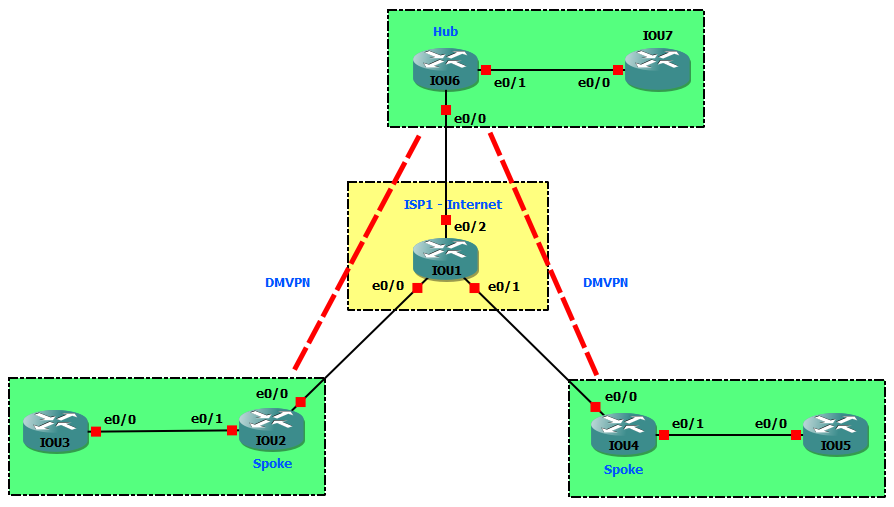
- Loopback IP: x.x.x.x/32
- Public IP: 209.165.xy.x/24
- Private IP: 192.168.xy.x/24
- Tunnel IP: 169.254.xyz.x/24
Task 1 Link to heading
- Configure EIGRP 1 on R1, R2, R4 and R6 to advertise Loopback 0 of R2, R4 and R6 to each other.
- Configure a static default route on R3 and R5 point to R2 and R4, respectively.
- Configure named EIGRP CCIE AS 100 in Hub and Spoke sites. Passive all inside LAN interfaces in Spoke sites.
Configuration Link to heading
hostname IOU1
int e0/0
    ip add 209.165.12.1 255.255.255.0
    no shut
int e0/1
    ip add 209.165.14.1 255.255.255.0
    no shut
int e0/2
    ip add 209.165.16.1 255.255.255.0
    no shut
router eigrp 1
    no auto
    net 0.0.0.0 255.255.255.255
hostname IOU2
int l0
    ip add 2.2.2.2 255.255.255.255
int e0/0
    ip add 209.165.12.2 255.255.255.0
    no shut
int e0/1
    ip add 192.168.23.2 255.255.255.0
    no shut
router eigrp 1
    no auto
    net 2.2.2.2 0.0.0.0
    net 209.165.12.0 0.0.0.255
router eigrp CCIE
    address-family ipv4 autonomous-system 100
        net 192.168.23.0 0.0.0.255
        topology base
        af-interface e0/1
            passive-interface
hostname IOU3
int e0/0
    ip add 192.168.23.3 255.255.255.0
    no shut
ip route 0.0.0.0 0.0.0.0 192.168.23.2
hostname IOU4
int l0
    ip add 4.4.4.4 255.255.255.255
int e0/0
    ip add 209.165.14.4 255.255.255.0
    no shut
int e0/1
    ip add 192.168.45.4 255.255.255.0
    no shut
router eigrp 1
    no auto
    net 4.4.4.4 0.0.0.0
    net 209.165.14.0 0.0.0.255
router eigrp CCIE
    address-family ipv4 autonomous-system 100
        net 192.168.45.0 0.0.0.255
        topology base
        af-interface e0/1
            passive-interface
hostname IOU5
int e0/0
    ip add 192.168.45.5 255.255.255.0
    no shut
ip route 0.0.0.0 0.0.0.0 192.168.45.4
hostname IOU6
int l0
    ip add 6.6.6.6 255.255.255.255
int e0/0
    ip add 209.165.16.6 255.255.255.0
    no shut
int e0/1
    ip add 192.168.67.6 255.255.255.0
    no shut
router eigrp 1
    no auto
    net 6.6.6.6 0.0.0.0
    net 209.165.16.0 0.0.0.255
router eigrp CCIE
    address-family ipv4 autonomous-system 100
        net 192.168.67.0 0.0.0.255
        topology base
Verification Link to heading
IOU6#show ip route eigrp
      2.0.0.0/32 is subnetted, 1 subnets
D        2.2.2.2 [90/435200] via 209.165.16.1, 00:00:23, Ethernet0/0
      4.0.0.0/32 is subnetted, 1 subnets
D        4.4.4.4 [90/435200] via 209.165.16.1, 00:00:23, Ethernet0/0
D     209.165.12.0/24 [90/307200] via 209.165.16.1, 00:00:23, Ethernet0/0
D     209.165.14.0/24 [90/307200] via 209.165.16.1, 00:00:23, Ethernet0/0

IOU6#show ip eigrp nei
EIGRP-IPv4 Neighbors for AS(1)
H   Address                 Interface              Hold Uptime   SRTT   RTO  Q  Seq
                                                   (sec)         (ms)       Cnt Num
0   209.165.16.1            Et0/0                    10 00:00:37   16   100  0  12
EIGRP-IPv4 VR(CCIE) Address-Family Neighbors for AS(100)
H   Address                 Interface              Hold Uptime   SRTT   RTO  Q  Seq
                                                   (sec)         (ms)       Cnt Num
0   192.168.67.7            Et0/1                    11 00:00:27    1  3000  0  1
Task 2: Link to heading
Configure DMVPN tunnels between R6, R2 and R4 as follows:
- Source tunnels from Loopback0 addresses.
- Use an NHRP network ID of 1.
- Use an NHRP authentication string of NHRPAUTH.
- Use GRE tunnel key of 2.
- DMVPN allows multicast.
- Enable EIGRP CCIE AS 100 on the tunnels.
- Ensure that Spokes send packets directly to each other.
Answer:
- By default, DMVPN allows only unicast => enable multicast by mapping to the NBMA address of Hub.
- Disable split-horizon on Hub to allow Spokes learn routes of each other.
- Using the command
no ip next-hop-self eigrp 100to not modify the next-hop value of EIGRP routes on Hub => allow Spokes send packets directly to each other.
Configuration Link to heading
IOU2(config)#
int tunnel 0
    ip add 169.254.246.2 255.255.255.0
    tunnel source l0
    tunnel mode gre multipoint
    ip nhrp nhs 169.254.246.6
    ip nhrp map 169.254.246.6 6.6.6.6
    ip nhrp map multicast 6.6.6.6
    ip nhrp map multicast dynamic
    ip nhrp network-id 1
    ip nhrp authentication NHRPAUTH
    tunnel key 2
router eigrp CCIE
    address-family ipv4 autonomous-system 100
        net 169.254.246.0 0.0.0.255
IOU4(config)#
int tunnel 0
    ip add 169.254.246.4 255.255.255.0
    tunnel source l0
    tunnel mode gre multipoint
    ip nhrp nhs 169.254.246.6
    ip nhrp map 169.254.246.6 6.6.6.6
    ip nhrp map multicast 6.6.6.6
    ip nhrp map multicast dynamic
    ip nhrp network-id 1
    ip nhrp authentication NHRPAUTH
    tunnel key 2
router eigrp CCIE
    address-family ipv4 autonomous-system 100
        net 169.254.246.0 0.0.0.255
IOU6(config)#
int tunnel 0
    ip add 169.254.246.6 255.255.255.0
    tunnel source l0
    tunnel mode gre multipoint
    ip nhrp map multicast dynamic
    ip nhrp network-id 1
    ip nhrp authentication NHRPAUTH
    tunnel key 2
router eigrp CCIE
    address-family ipv4 autonomous-system 100
        net 169.254.246.0 0.0.0.255
        af-interface Tunnel0
            no next-hop-self
            no split-horizon
Verification Link to heading
IOU2#show ip route eigrp
      4.0.0.0/32 is subnetted, 1 subnets
D        4.4.4.4 [90/435200] via 209.165.12.1, 00:05:05, Ethernet0/0
      6.0.0.0/32 is subnetted, 1 subnets
D        6.6.6.6 [90/435200] via 209.165.12.1, 00:04:50, Ethernet0/0
D     192.168.45.0/24 [90/102912000] via 169.254.246.4, 00:00:17, Tunnel0
D     192.168.67.0/24 [90/77312000] via 169.254.246.6, 00:00:17, Tunnel0
D     209.165.14.0/24 [90/307200] via 209.165.12.1, 00:05:26, Ethernet0/0
D     209.165.16.0/24 [90/307200] via 209.165.12.1, 00:05:26, Ethernet0/0
Task 3 Link to heading
No EIGRP, configure OSPF to form neighbor between Hub and Spokes via tunnels.
Answer:
By default, when OSPF is enabled, the network type of tunnel interface is point-to-point.
=> Change it to point-to-multipoint or broadcast, if not the OPSF will be flapping.
=> Broadcast is more preferable than point-to-multipoint. Because OSPF does not support next-hop-self command, with broadcast, the next hop will be redirected to other Spokes instead of Hub.
IOU6#show ip ospf int tun 0
Tunnel0 is up, line protocol is up
  Internet Address 169.254.246.6/24, Area 0, Attached via Interface Enable
  Process ID 100, Router ID 1.1.1.1, Network Type POINT_TO_POINT, Cost: 1000
  Topology-MTID    Cost    Disabled    Shutdown      Topology Name
        0           1000      no          no            Base
  Enabled by interface config, including secondary ip addresses
  Transmit Delay is 1 sec, State DOWN
  Timer intervals configured, Hello 10, Dead 40, Wait 40, Retransmit 5
    oob-resync timeout 40
Configuration Link to heading
IOU2(config)#
no router eigrp CCIE
router ospf 100
    passive-interface e0/1
int e0/1
    ip ospf 100 area 0
int tunnel 0
    ip ospf 100 area 0
    ip ospf network broadcast
    ip ospf priority 0
IOU4(config)#
no router eigrp CCIE
router ospf 100
    passive-interface e0/1
int e0/1
    ip ospf 100 area 0
int tunnel 0
    ip ospf 100 area 0
    ip ospf network broadcast
    ip ospf priority 0
IOU6(config)#
no router eigrp CCIE
router ospf 100
    passive-interface e0/1
int e0/1
    ip ospf 100 area 0
int tunnel 0
    ip ospf 100 area 0
    ip ospf network broadcast
Verification Link to heading
IOU2#show ip route ospf
O     192.168.45.0/24 [110/1010] via 169.254.246.4, 00:01:23, Tunnel0
O     192.168.67.0/24 [110/1010] via 169.254.246.6, 00:01:23, Tunnel0

IOU2#show ip ospf nei
Neighbor ID     Pri   State           Dead Time   Address         Interface
6.6.6.6           1   FULL/DR         00:00:36    169.254.246.6   Tunnel0
Task 4 Link to heading
Configure IPsec tunnels as follows:
- Use an ISAKMP Policy with the following options:
- Pre-Shared Key: CISCO
- Encryption: 3DES
- Hash: MD5
- Diffie-Hellman Group: 5
- Use a Crypto Map named GRE_OVER_IPSEC_MAP with the following options:
- Loopbacks will be the tunnel endpoints
- GRE Traffic should be sent inside the IPsec tunnels
- Encrypt the traffic using 128-bit AES
- Authenticate the traffic using SHA-1
- Use ESP Transport mode to save additional encapsulation overhead
- To prevent the tunnel endpoints from having to do IPsec fragmentation, configure the GRE tunnel IP MTU to 1400 bytes, and set them to adjust the TCP MSS accordingly.
Answer:
- Loopbacks will be the tunnel endpoints =>
crypto map GRE_OVER_IPSEC_MAP local-address Loopback0 - Traffic goes from LAN sites to LAN sites is (IP over GRE) over IPSec
=> GRE header is combination of 2.2.2.2, 4.4.4.4 or 6.6.6.6.
=> Access-list for IPSec must match these GRE header, otherwise the IPSec tunnel cannot form.
- Enable
crypto map GRE_OVER_IPSEC_MAPon physical interfaces.
Configuration Link to heading
IOU2(config)#
crypto isakmp policy 10
    encr 3des
    hash md5
    authentication pre-share
    group 5
crypto isakmp key CISCO address 0.0.0.0
crypto ipsec transform-set ESP_AES_128_SHA_1 esp-aes 128 esp-sha-hmac
    mode transport
crypto map GRE_OVER_IPSEC_MAP local-address Loopback0
ip access-list extended GRE_TRAFFIC
    permit gre host 2.2.2.2 host 6.6.6.6
    permit gre host 2.2.2.2 host 4.4.4.4
crypto map GRE_OVER_IPSEC_MAP 10 ipsec-isakmp
    set peer 4.4.4.4
    set peer 6.6.6.6
    set transform-set ESP_AES_128_SHA_1
    match address GRE_TRAFFIC
int tunnel 0
    ip mtu 1400
    ip tcp adjust-mss 1360
int e0/0
    crypto map GRE_OVER_IPSEC_MAP
IOU4(config)#
crypto isakmp policy 10
    encr 3des
    hash md5
    authentication pre-share
    group 5
crypto isakmp key CISCO address 0.0.0.0
crypto ipsec transform-set ESP_AES_128_SHA_1 esp-aes 128 esp-sha-hmac
    mode transport
crypto map GRE_OVER_IPSEC_MAP local-address Loopback0
ip access-list extended GRE_TRAFFIC
    permit gre host 4.4.4.4 host 6.6.6.6
    permit gre host 4.4.4.4 host 2.2.2.2
crypto map GRE_OVER_IPSEC_MAP 10 ipsec-isakmp
    set peer 2.2.2.2
    set peer 6.6.6.6
    set transform-set ESP_AES_128_SHA_1
    match address GRE_TRAFFIC
int tunnel 0
    ip mtu 1400
    ip tcp adjust-mss 1360
int e0/0
    crypto map GRE_OVER_IPSEC_MAP
IOU6(config)#
crypto isakmp policy 10
    encr 3des
    hash md5
    authentication pre-share
    group 5
crypto isakmp key CISCO address 0.0.0.0
crypto ipsec transform-set ESP_AES_128_SHA_1 esp-aes 128 esp-sha-hmac
    mode transport
crypto map GRE_OVER_IPSEC_MAP local-address Loopback0
ip access-list extended GRE_TRAFFIC
    permit gre host 6.6.6.6 host 2.2.2.2
    permit gre host 6.6.6.6 host 4.4.4.4
crypto map GRE_OVER_IPSEC_MAP 10 ipsec-isakmp
    set peer 4.4.4.4
    set peer 2.2.2.2
    set transform-set ESP_AES_128_SHA_1
    match address GRE_TRAFFIC
int tunnel 0
    ip mtu 1400
    ip tcp adjust-mss 1360
int e0/0
    crypto map GRE_OVER_IPSEC_MAP
Verification Link to heading
IOU2#show crypto isakmp sa
IPv4 Crypto ISAKMP SA
dst             src             state          conn-id status
4.4.4.4         2.2.2.2         QM_IDLE           1003 ACTIVE
6.6.6.6         2.2.2.2         QM_IDLE           1002 ACTIVE
IOU3#ping 192.168.45.5
Type escape sequence to abort.
Sending 5, 100-byte ICMP Echos to 192.168.45.5, timeout is 2 seconds:
!!!!!
Success rate is 100 percent (5/5), round-trip min/avg/max = 1/7/10 ms
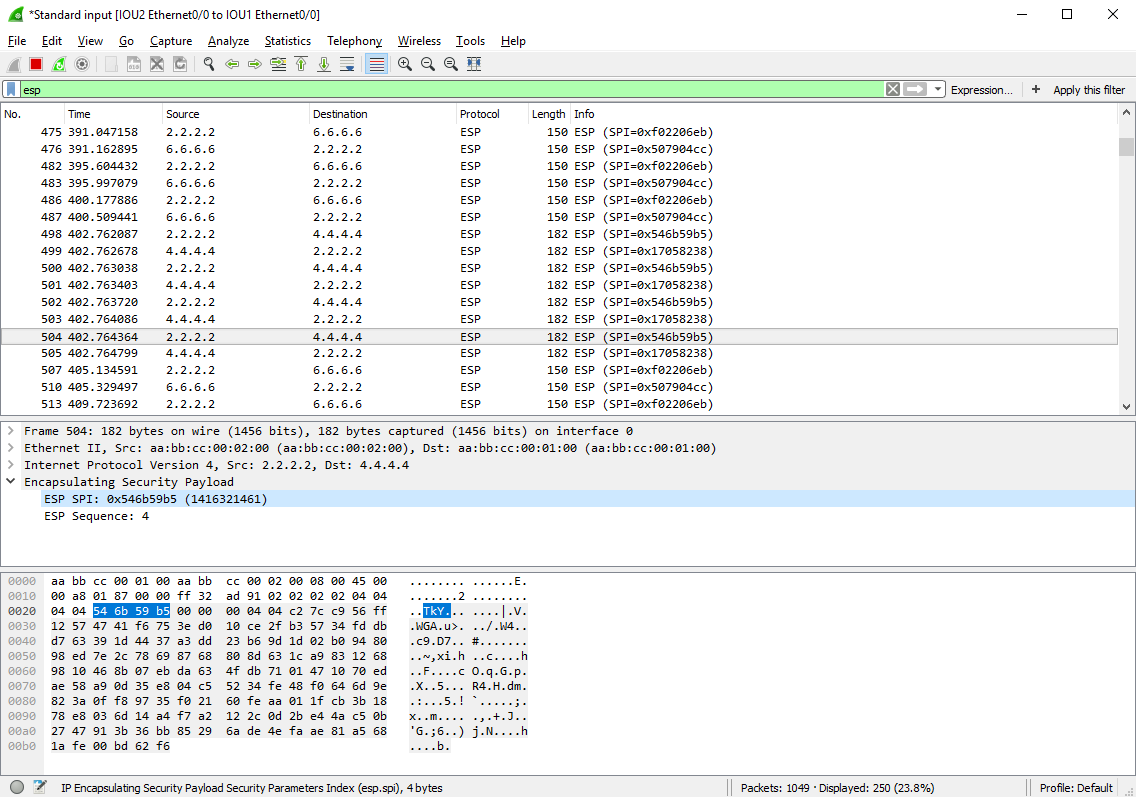
Now all LAN traffic (include EIGRP hello) is encrypted as ESP packets:
Task 5 Link to heading
- Delete the above crypto map GRE_OVER_IPSEC_MAP.
- Use IPsec Profile named GRE_OVER_IPSEC_PROFILE with the same options.
Answer: Enable IPSec Profile on tunnel interface.
Configuration Link to heading
IOU2(config)#
int e0/0
    no crypto map GRE_OVER_IPSEC_MAP
    exit
no crypto map GRE_OVER_IPSEC_MAP
crypto ipsec profile GRE_OVER_IPSEC_PROFILE
    set transform-set ESP_AES_128_SHA_1
int tunnel 0
    tunnel protection ipsec profile GRE_OVER_IPSEC_PROFILE
IOU4(config)#
int e0/0
    no crypto map GRE_OVER_IPSEC_MAP
    exit
no crypto map GRE_OVER_IPSEC_MAP
crypto ipsec profile GRE_OVER_IPSEC_PROFILE
    set transform-set ESP_AES_128_SHA_1
int tunnel 0
    tunnel protection ipsec profile GRE_OVER_IPSEC_PROFILE
IOU6(config)#
int e0/0
    no crypto map GRE_OVER_IPSEC_MAP
    exit
no crypto map GRE_OVER_IPSEC_MAP
crypto ipsec profile GRE_OVER_IPSEC_PROFILE
    set transform-set ESP_AES_128_SHA_1
int tunnel 0
    tunnel protection ipsec profile GRE_OVER_IPSEC_PROFILE
Verification Link to heading
IOU3#ping 192.168.45.5
Type escape sequence to abort.
Sending 5, 100-byte ICMP Echos to 192.168.45.5, timeout is 2 seconds:
!!!!!
Success rate is 100 percent (5/5), round-trip min/avg/max = 1/1/1 ms