Your service emits ten thousand log lines a minute. When it breaks at 2 AM, you grep through them, pattern-match by eye, and eventually find the one line that mattered. You’ve just done manually what a machine should have done automatically. This is the fundamental problem with logging as a primary observability strategy.
This post argues that logs are the wrong primitive for understanding system behavior at scale, explains the OpenTelemetry model that replaces them, and walks through a hands-on Python lab that exports telemetry to Honeycomb so you can see the difference yourself.
The Problem with Logs Link to heading
Logs feel natural because they mirror how we think: something happened, write it down. But at scale, that model breaks in three specific ways.
Logs are unstructured by default. Even when you write JSON, different services use different field names for the same concept. One service logs user_id, another logs userId, another logs uid. Querying across services requires knowing every convention — and conventions drift.
Logs are high-cardinality nightmares. A request ID, a user ID, a tenant ID — each is a dimension you might want to slice by. In a log aggregator, adding a new field to search costs real money because the indexing model treats every field value as a term to invert. You end up sampling aggressively or dropping fields that would have mattered.
Logs tell you what happened, not why it was slow. A log line with status=200 duration=2400ms tells you a request was slow. It does not tell you whether the slowness was in your DB query, your downstream API call, your serialization, or your connection pool wait. To know that, you need timing relationships between operations — which is what traces give you.
The OpenTelemetry Model Link to heading
OpenTelemetry (OTel) is a CNCF project that standardizes how telemetry is generated, collected, and exported. It defines three signals:
Traces Link to heading
A trace represents a single end-to-end operation — a user request, a background job, a message consumed from a queue. It is made up of spans.
A span is a single unit of work within that trace: “query the database”, “call the payments API”, “serialize the response”. Each span has:
- A name
- A start time and duration
- A parent span ID (how the tree is built)
- Attributes — typed key-value pairs attached to the span (e.g.,
db.statement,http.status_code,user.id) - A status (OK, Error, Unset)
- Events — timestamped log-like annotations within a span’s lifetime
Spans form a tree. The root span is the trace. Every child span knows its parent. This structure is what lets you see — visually, as a flame graph — exactly where time was spent.
[HTTP request: POST /checkout]          0ms ──────────────────── 420ms
  [validate cart]                       0ms ── 12ms
  [charge payment]                      12ms ────────── 180ms
    [call stripe API]                   15ms ──────── 170ms
  [update inventory]                    195ms ──── 60ms
    [SQL: UPDATE products ...]          198ms ── 55ms
  [send confirmation email]             260ms ── 30ms
No log line gives you this. You can’t reconstruct this from duration=420ms at the top level.
Metrics Link to heading
A metric is a numeric measurement over time: request count, error rate, p99 latency, queue depth, active connections. OTel defines several instrument types:
| Instrument | Use case |
|---|---|
Counter | Monotonically increasing value (request count, errors) |
UpDownCounter | Value that goes up and down (queue depth, active connections) |
Histogram | Distribution of values (request latency — gives you percentiles) |
Gauge | Point-in-time measurement (CPU usage, memory) |
Metrics are cheap to store and query. A histogram of 10,000 requests compresses to a few dozen bucket counts. You can alert on them without scanning every log line.
Logs (the OTel kind) Link to heading
OTel does have a logs signal — but in the OTel model, logs are correlated with traces. A log event carries the trace_id and span_id of the span it was emitted during. This means you can jump from a metric anomaly → find the relevant traces → find the specific log events within those spans. Logs become supporting evidence, not the primary interface.
The Collector Link to heading
The OpenTelemetry Collector is a vendor-neutral proxy that receives telemetry, processes it, and exports it to one or more backends. Your application sends OTLP to the Collector; the Collector handles backend-specific protocols and routing.
App (SDK) → OTLP → Collector → Honeycomb
                             → Prometheus
                             → Jaeger
The Collector has three pipeline stages:
- Receivers — accept incoming telemetry (OTLP, Zipkin, Jaeger, Prometheus scrape, etc.)
- Processors — transform data in flight (batch, filter, enrich, sample)
- Exporters — send to a backend (Honeycomb, Datadog, a file, stdout)
When to skip it: Direct SDK export is fine for local development and single-backend setups with no sampling or enrichment requirements.
When you need it:
| Scenario | Why the Collector helps |
|---|---|
| Multiple backends | Fan-out to Honeycomb + Prometheus + Jaeger without touching app code |
| Tail-based sampling | SDK can only sample at the start of a trace (head-based). The Collector sees the full trace before deciding — always keep errors, sample the rest |
| PII scrubbing | Strip user.email, passwords, tokens before they leave your network — in one place, not in every service |
| Backend is flaky | The Collector queues and retries; your app doesn’t stall waiting for an unavailable backend |
| Kubernetes enrichment | Inject pod name, node, namespace, region from the environment without app code changes |
| Centralized routing | Change backend or sampling rate by updating one Collector config, not redeploying every service |
The Lab Link to heading
We’ll build a simple Python HTTP service, instrument it with OpenTelemetry, and export traces and metrics to Honeycomb.
Prerequisites Link to heading
- Python 3.11+
- A free Honeycomb account (the free tier is sufficient)
- Your Honeycomb API key (from Team Settings → API Keys)
Project structure Link to heading
otel-lab/
├── main.py
├── requirements.txt
└── .env
# requirements.txt
fastapi==0.115.0
uvicorn==0.30.0
opentelemetry-sdk==1.25.0
opentelemetry-api==1.25.0
opentelemetry-instrumentation-fastapi==0.46b0
opentelemetry-instrumentation-httpx==0.46b0
opentelemetry-exporter-otlp-proto-http==1.25.0
httpx==0.27.0
python-dotenv==1.0.0
# .env
HONEYCOMB_API_KEY=your_api_key_here
OTEL_SERVICE_NAME=otel-lab
# main.py
import os
import random
import time
from dotenv import load_dotenv

from opentelemetry import trace, metrics
from opentelemetry.sdk.trace import TracerProvider
from opentelemetry.sdk.trace.export import BatchSpanProcessor
from opentelemetry.sdk.metrics import MeterProvider
from opentelemetry.sdk.metrics.export import PeriodicExportingMetricReader
from opentelemetry.exporter.otlp.proto.http.trace_exporter import OTLPSpanExporter
from opentelemetry.exporter.otlp.proto.http.metric_exporter import OTLPMetricExporter
from opentelemetry.instrumentation.fastapi import FastAPIInstrumentor

from fastapi import FastAPI, HTTPException
import httpx

load_dotenv()

HONEYCOMB_ENDPOINT = "https://api.honeycomb.io"
API_KEY = os.environ["HONEYCOMB_API_KEY"]
SERVICE_NAME = os.environ.get("OTEL_SERVICE_NAME", "otel-lab")

HEADERS = {
    "x-honeycomb-team": API_KEY,
    "x-honeycomb-dataset": SERVICE_NAME,
}

# --- Tracing setup ---
tracer_provider = TracerProvider()
tracer_provider.add_span_processor(
    BatchSpanProcessor(
        OTLPSpanExporter(
            endpoint=f"{HONEYCOMB_ENDPOINT}/v1/traces",
            headers=HEADERS,
        )
    )
)
trace.set_tracer_provider(tracer_provider)
tracer = trace.get_tracer(SERVICE_NAME)

# --- Metrics setup ---
metric_reader = PeriodicExportingMetricReader(
    OTLPMetricExporter(
        endpoint=f"{HONEYCOMB_ENDPOINT}/v1/metrics",
        headers=HEADERS,
    ),
    export_interval_millis=10_000,
)
meter_provider = MeterProvider(metric_readers=[metric_reader])
metrics.set_meter_provider(meter_provider)
meter = metrics.get_meter(SERVICE_NAME)

# Define instruments
checkout_counter = meter.create_counter(
    "checkout.requests",
    description="Number of checkout requests",
)
checkout_error_counter = meter.create_counter(
    "checkout.errors",
    description="Number of failed checkouts",
)
checkout_duration = meter.create_histogram(
    "checkout.duration",
    description="Checkout request duration in ms",
    unit="ms",
)

# --- App ---
app = FastAPI()
FastAPIInstrumentor.instrument_app(app)


@app.get("/checkout/{user_id}")
async def checkout(user_id: str):
    start = time.time()
    checkout_counter.add(1, {"user.id": user_id})

    with tracer.start_as_current_span("checkout") as span:
        span.set_attribute("user.id", user_id)
        span.set_attribute("checkout.version", "v2")

        # Simulate validating the cart
        with tracer.start_as_current_span("validate_cart"):
            time.sleep(random.uniform(0.01, 0.05))

        # Simulate a downstream payment call
        with tracer.start_as_current_span("charge_payment") as payment_span:
            # Randomly fail 10% of the time
            if random.random() < 0.1:
                payment_span.set_status(
                    trace.StatusCode.ERROR, "payment gateway timeout"
                )
                payment_span.set_attribute("error", True)
                checkout_error_counter.add(1, {"user.id": user_id, "reason": "payment_timeout"})
                duration_ms = (time.time() - start) * 1000
                checkout_duration.record(duration_ms, {"status": "error"})
                raise HTTPException(status_code=502, detail="Payment gateway timeout")

            time.sleep(random.uniform(0.1, 0.3))
            payment_span.set_attribute("payment.provider", "stripe")
            payment_span.set_attribute("payment.amount_cents", random.randint(500, 50000))

        # Simulate inventory update
        with tracer.start_as_current_span("update_inventory"):
            time.sleep(random.uniform(0.02, 0.08))

        duration_ms = (time.time() - start) * 1000
        checkout_duration.record(duration_ms, {"status": "ok"})
        span.set_attribute("checkout.duration_ms", duration_ms)

        return {"status": "ok", "user_id": user_id, "duration_ms": duration_ms}


@app.get("/health")
async def health():
    return {"status": "ok"}
Run it Link to heading
uvicorn main:app --port 8000
Generate some traffic:
# Send 50 requests across a few users
for i in $(seq 1 50); do
  curl -s "http://localhost:8000/checkout/user-$((RANDOM % 5))" | python3 -m json.tool
done
What to look at in Honeycomb Link to heading
After a minute or two of traffic, open Honeycomb and select your dataset (otel-lab).
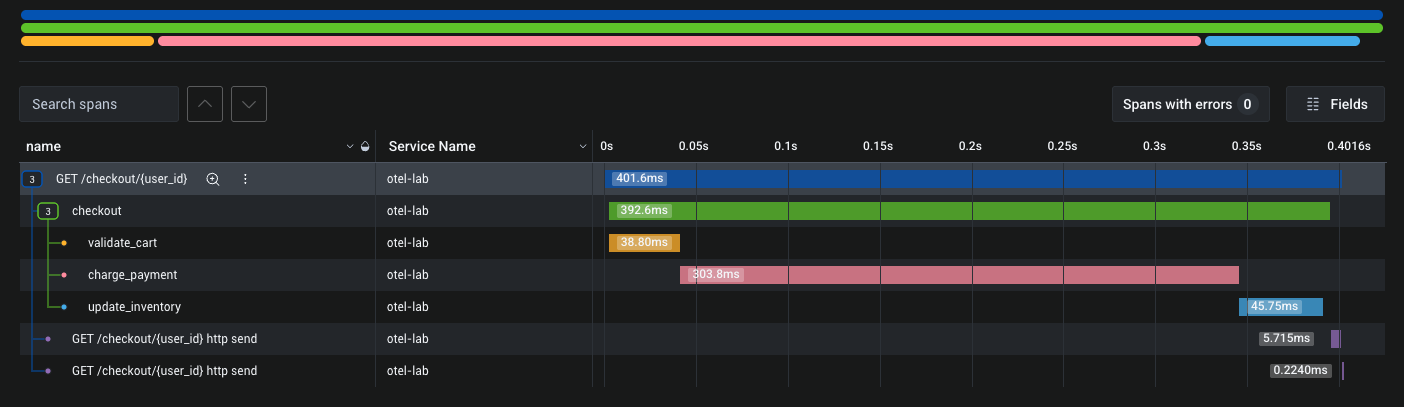
Trace view: Click “New Query” and group by name to see your span names. Click any trace to open the waterfall — you’ll see checkout as the root with validate_cart, charge_payment, and update_inventory nested beneath it. The width of each bar is the actual duration.
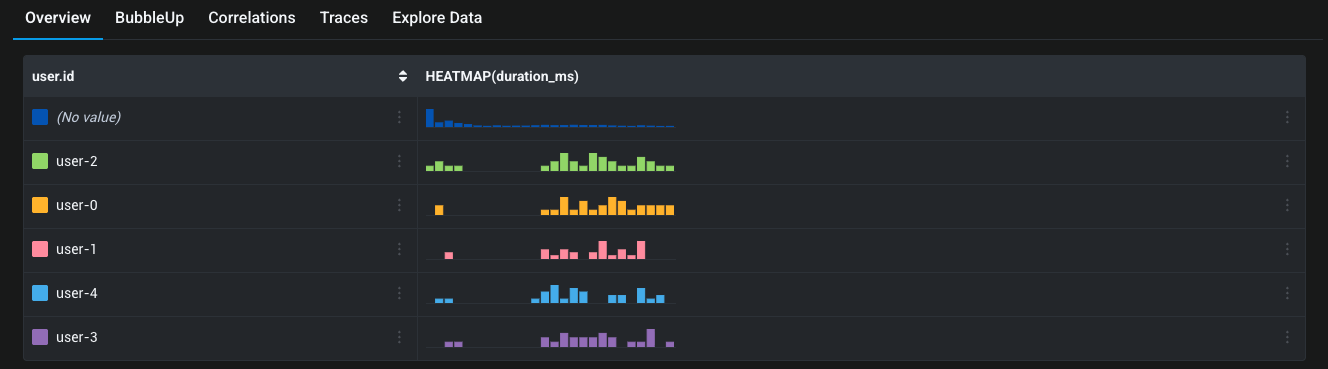
Find slow checkouts: Run a query with HEATMAP(duration_ms) grouped by user.id. You’ll see the distribution of latency per user. This is something you cannot do with text logs without enormous indexing cost.
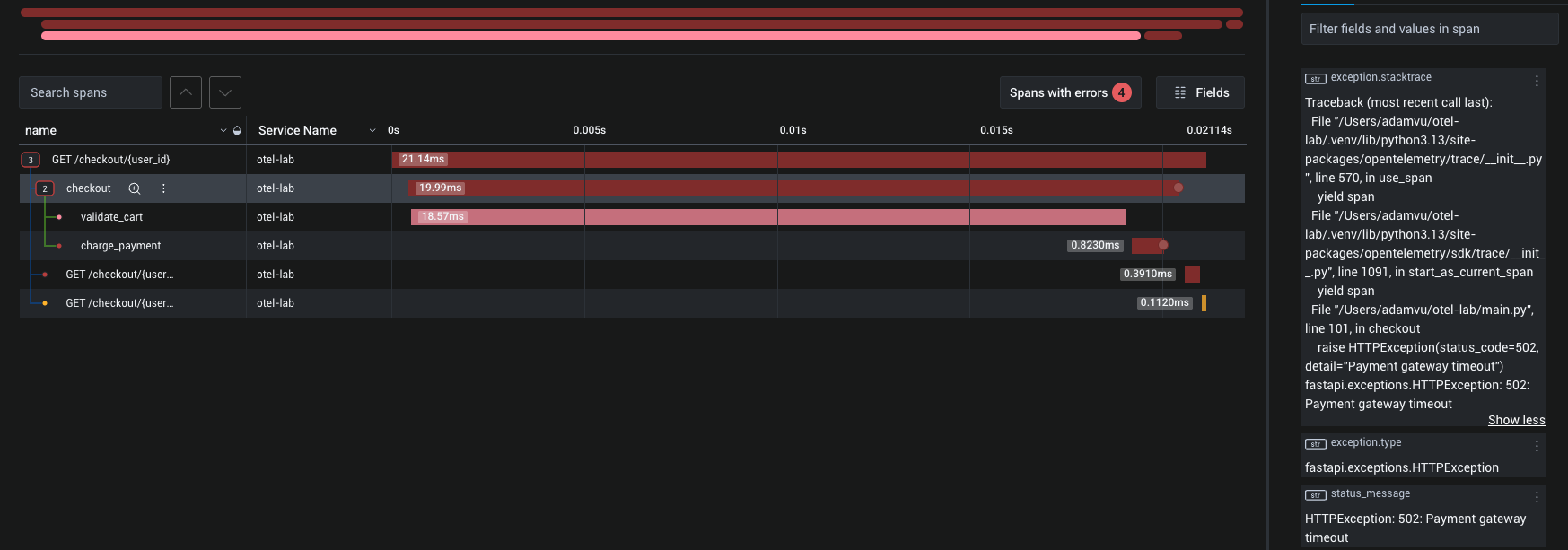
Find errors: Filter to error=true. Every failed payment span is there, with its user.id and the parent trace. Click through to see the full trace — where the error occurred, how far along the checkout was, what the payment amount would have been.
Metrics: In the Metrics tab, you’ll see checkout.requests as a rate over time, and checkout.duration as a heatmap showing p50/p95/p99 latency buckets. Set an alert on checkout.errors rising above a threshold — this is your 2 AM page, not a grep.
Lab Extension: Adding the Collector Link to heading
The lab above exports directly from the SDK to Honeycomb. Here’s how to insert the Collector between them — the app change is one line, but you gain tail-based sampling and the ability to fan out to multiple backends.
Updated project structure Link to heading
otel-lab/
├── main.py
├── requirements.txt
├── .env
├── otel-collector-config.yaml
└── docker-compose.yaml
# otel-collector-config.yaml
receivers:
  otlp:
    protocols:
      grpc:
        endpoint: 0.0.0.0:4317
      http:
        endpoint: 0.0.0.0:4318

processors:
  batch:
    timeout: 5s
    send_batch_size: 512

  # Tail-based sampling: keep all error traces, sample 20% of OK traces
  tail_sampling:
    decision_wait: 10s
    policies:
      - name: keep-errors
        type: status_code
        status_code: {status_codes: [ERROR]}
      - name: sample-ok
        type: probabilistic
        probabilistic: {sampling_percentage: 20}

  # Strip a sensitive attribute before it leaves your network
  attributes/redact:
    actions:
      - key: user.email
        action: delete

exporters:
  otlphttp/honeycomb:
    endpoint: https://api.honeycomb.io
    headers:
      x-honeycomb-team: ${env:HONEYCOMB_API_KEY}
      x-honeycomb-dataset: otel-lab

  # Also log spans to stdout for local debugging
  debug:
    verbosity: basic

service:
  pipelines:
    traces:
      receivers: [otlp]
      processors: [batch, tail_sampling, attributes/redact]
      exporters: [otlphttp/honeycomb, debug]
    metrics:
      receivers: [otlp]
      processors: [batch]
      exporters: [otlphttp/honeycomb]
# docker-compose.yaml
services:
  collector:
    image: otel/opentelemetry-collector-contrib:0.103.0
    command: ["--config=/etc/otel/config.yaml"]
    volumes:
      - ./otel-collector-config.yaml:/etc/otel/config.yaml
    environment:
      - HONEYCOMB_API_KEY=${HONEYCOMB_API_KEY}
    ports:
      - "4317:4317"   # OTLP gRPC
      - "4318:4318"   # OTLP HTTP
App change Link to heading
Only the exporter endpoint changes. Instead of pointing at Honeycomb directly, point at the Collector:
# Before (direct to Honeycomb)
HONEYCOMB_ENDPOINT = "https://api.honeycomb.io"

# After (via Collector)
COLLECTOR_ENDPOINT = os.environ.get("OTEL_EXPORTER_ENDPOINT", "http://localhost:4318")

OTLPSpanExporter(endpoint=f"{COLLECTOR_ENDPOINT}/v1/traces")
OTLPMetricExporter(endpoint=f"{COLLECTOR_ENDPOINT}/v1/metrics")
No headers needed — the Collector holds the Honeycomb API key, not the app. This matters in practice: rotating the API key is a Collector config change, not a redeployment of every service.
Run it Link to heading
docker compose up
uvicorn main:app --port 8000   # or let docker-compose run it
Generate traffic the same way as before. Now watch the Collector’s stdout — you’ll see debug exporter output showing which traces were kept by tail sampling and which were dropped. In Honeycomb, you’ll only see the 20% sample of successful traces plus 100% of the erroring ones.
What tail-based sampling buys you Link to heading
With head-based sampling (SDK-only), you make the keep/drop decision at the start of a request before you know if it will error or be slow. You might drop a trace that later becomes the only evidence of an incident.
With the Collector’s tail_sampling processor, the decision happens after decision_wait (10 seconds above) — after all spans for a trace have arrived. You can write policies like:
- Always keep traces with
ERRORstatus - Always keep traces slower than 2000ms
- Sample 5% of everything else
This is the main production reason to run a Collector. Everything else (fan-out, enrichment, redaction) is valuable but can be deferred.
What You Would Have Logged Instead Link to heading
Consider what the log-based version of this looks like:
INFO  2026-05-19T02:14:55Z user_id=user-3 action=checkout status=ok duration_ms=187
INFO  2026-05-19T02:14:56Z user_id=user-1 action=checkout status=ok duration_ms=210
ERROR 2026-05-19T02:14:57Z user_id=user-2 action=checkout status=error error="Payment gateway timeout"
INFO  2026-05-19T02:14:58Z user_id=user-0 action=checkout status=ok duration_ms=142
You know something failed. You don’t know:
- How far into the checkout did it fail? Was validate_cart slow before the error?
- Is user-2 the only affected user, or is this systemic?
- What was the p95 latency of the successful checkouts in the last 5 minutes?
- Is the failure rate trending up?
With traces, the first two questions are answered by clicking the trace. With metrics, the last two are answered by a pre-built dashboard that required no new log parsing.
The Practical Migration Path Link to heading
You don’t have to remove your logs tomorrow. A realistic migration looks like:
- Add OTel instrumentation alongside your existing logging. The SDKs don’t conflict with your logger.
- Move structured fields from log statements to span attributes.
logger.info("checkout done", user_id=user_id, duration=duration)→span.set_attribute("user.id", user_id). - Replace ad-hoc counters and timers with OTel instruments. Statsd calls, Prometheus client calls — these map directly to OTel counters and histograms.
- Use OTel log correlation. If you keep a logger for narrative context, emit it with the current
trace_idattached. Most OTel logging bridges do this automatically. - Reduce log verbosity. Once metrics answer “is the error rate up?” and traces answer “which requests failed and why?”, most INFO logs are noise. Remove them or move them to span events.
Summary Link to heading
Logs are a write-to-file habit from a world where that was the only tool available. OpenTelemetry gives you three better primitives:
- Traces and spans for understanding the shape and timing of work
- Metrics for aggregate health and alerting
- Correlated logs for narrative context when traces and metrics aren’t enough
The Honeycomb lab above produces richer diagnostic information in 150 lines of Python than most logging setups produce with thousands. The query you couldn’t write against a log index — “show me p95 latency grouped by user, filtered to erroring checkouts” — is a ten-second Honeycomb query against your spans.
Stop writing log lines. Start attaching attributes to spans.