What is SQL Injection? Link to heading
SQL Injection occurs when an attacker is able to insert or “inject” malicious SQL statements into an application’s database query. This happens when user input is directly concatenated into SQL queries without proper sanitization.
Demo Link to heading
Let’s create a simple user authentication system that’s vulnerable to SQL injection. We’ll use:
- Flask for the web application
- MySQL for the database
Project Structure Link to heading
sql-injection-demo
├── Dockerfile
├── app.py
├── docker-compose.yml
├── init.sql
└── templates
    └── login.html
# docker-compose.yml
services:
  db:
    image: mysql:8.0
    environment:
      MYSQL_ROOT_PASSWORD: password
      MYSQL_DATABASE: users
    ports:
      - "3306:3306"
    volumes:
      - ./init.sql:/docker-entrypoint-initdb.d/init.sql

  app:
    build: ./
    ports:
      - "5000:5000"
    environment:
      DB_HOST: db
      DB_USER: root
      DB_PASSWORD: password
      DB_NAME: users
    depends_on:
      - db
# Dockerfile
FROM python:3.9-slim

WORKDIR /app

RUN pip install --no-cache-dir \
    Flask==2.0.1 \
    Werkzeug==2.2.2 \
    mysql-connector-python==8.0.26

COPY app.py .
COPY templates ./templates

CMD ["python", "app.py"]
-- init.sql
CREATE TABLE users (
    id INT AUTO_INCREMENT PRIMARY KEY,
    username VARCHAR(50) NOT NULL,
    password VARCHAR(50) NOT NULL
);

INSERT INTO users (username, password) VALUES
('admin', 'admin123'),
('user1', 'password1'),
('user2', 'password2');
# app.py
from flask import Flask, request, render_template
import mysql.connector
import os

app = Flask(__name__)

def get_db_connection():
    return mysql.connector.connect(
        host=os.getenv('DB_HOST'),
        user=os.getenv('DB_USER'),
        password=os.getenv('DB_PASSWORD'),
        database=os.getenv('DB_NAME')
    )

@app.route('/', methods=['GET', 'POST'])
def login():
    if request.method == 'POST':
        username = request.form['username']
        password = request.form['password']

        conn = get_db_connection()
        cursor = conn.cursor()
        # Vulnerable SQL query - direct string concatenation
        query = f"SELECT * FROM users WHERE username = '{username}' AND password = '{password}'"
        cursor.execute(query)
        user = cursor.fetchone()
        cursor.close()
        conn.close()

        if user:
            return f"Welcome, {user[1]}!"
        return "Invalid credentials"

    return render_template('login.html')

if __name__ == '__main__':
    app.run(host='0.0.0.0', debug=True)
<!-- templates/login.html -->
<!DOCTYPE html>
<html>
<head>
    <title>Login</title>
    <style>
        body {
            font-family: Arial, sans-serif;
            max-width: 400px;
            margin: 0 auto;
            padding: 20px;
        }
        .form-group {
            margin-bottom: 15px;
        }
        label {
            display: block;
            margin-bottom: 5px;
        }
        input {
            width: 100%;
            padding: 8px;
            border: 1px solid #ddd;
            border-radius: 4px;
        }
        button {
            background-color: #4CAF50;
            color: white;
            padding: 10px 15px;
            border: none;
            border-radius: 4px;
            cursor: pointer;
        }
        button:hover {
            background-color: #45a049;
        }
    </style>
</head>
<body>
    <h2>Login</h2>
    <form method="POST">
        <div class="form-group">
            <label>Username:</label>
            <input type="text" name="username" required>
        </div>
        <div class="form-group">
            <label>Password:</label>
            <input type="password" name="password" required>
        </div>
        <button type="submit">Login</button>
    </form>
</body>
</html>
Demonstrating the Attack Link to heading
- Start the applications:
docker-compose up --build
Access the vulnerable application at http://localhost:5000. You should see the login page.
Enter the following malicious input:
Username: admin' #
Password: anything
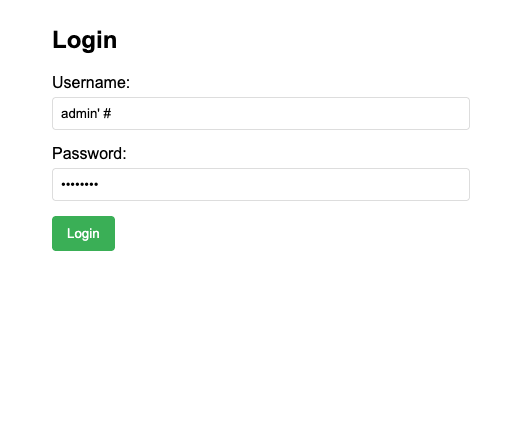
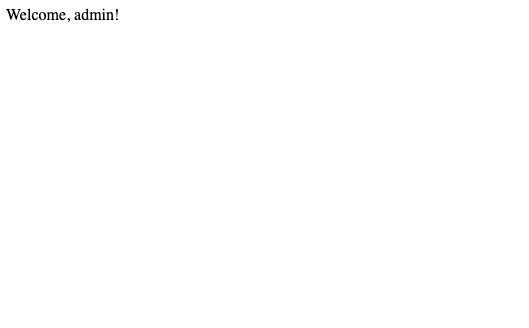
This will log you in as admin without knowing the password.
Prevention Techniques Link to heading
Parameterized Queries
- Use placeholders instead of string concatenation
- Let the database driver handle escaping
- Example:
cursor.execute("SELECT * FROM users WHERE username = %s", (username,))
Input Validation
- Validate input format and length
- Use allowlists instead of blocklists
- Example:
if not username.isalnum(): return "Invalid username"
Least Privilege
- Use database users with minimal permissions
- Avoid using root/admin accounts
- Example: Create a specific user for the application
ORM Usage
- Use Object-Relational Mapping libraries
- They handle SQL injection prevention automatically
- Example: SQLAlchemy, Django ORM