The Problem Link to heading
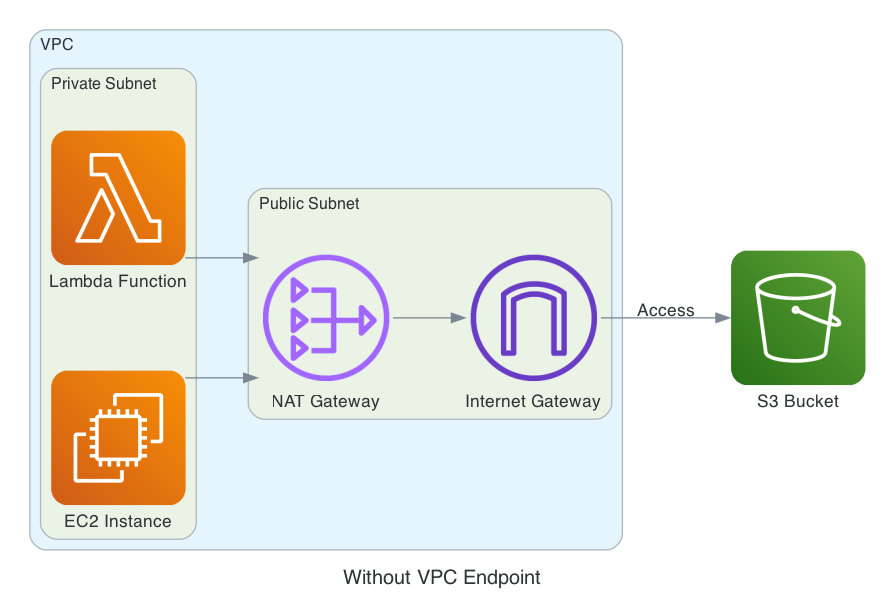
When working with AWS resources in private subnets, there’s a common challenge: how to access AWS services like S3 without exposing your resources to the internet. Traditionally, this was solved using NAT Gateways, but this approach has several drawbacks:
- Cost: NAT Gateways are charged per hour and per GB of data processed
- Complexity: Requires managing public subnets and Internet Gateways
- Security: Traffic still goes through the public internet
- Performance: Additional network hop through NAT Gateway
The Solution: VPC Endpoints Link to heading
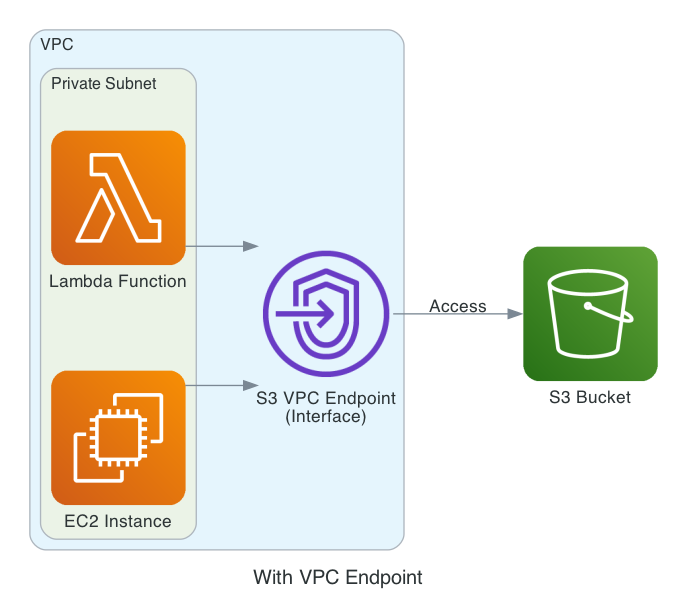
VPC Endpoints provide a more elegant solution by creating a private connection between your VPC and AWS services.
- Cost Savings
- No NAT Gateway costs, no data processing fees
- Traffic stays within AWS network
- Enhanced Security
- No exposure to the public internet, traffic remains within AWS network
- Can be controlled through security groups and endpoint policies
- Better Performance
- Direct connection to AWS services, lower latency
- No network hop through NAT Gateway
Demo: Lambda Accessing S3 Through VPC Endpoint Link to heading
Let’s walk through a practical example of a Lambda function in a private subnet accessing an S3 bucket through a VPC Endpoint.
Architecture Overview Link to heading
- 1 VPC with 1 private subnet
- 1 S3 bucket for storing metadata file
- 1 Lambda function in the private subnet
- VPC Endpoint for S3 access
- No NAT Gateway needed
Setup VPC and S3 bucket Link to heading
Create a VPC with a private subnet
# main.tf
provider "aws" {
  region = "us-west-2"
}

locals {
  prefix = "vpc-endpoint-demo"
}
# vpc.tf
resource "aws_vpc" "main" {
  cidr_block           = "10.0.0.0/16"
  enable_dns_support   = true
  enable_dns_hostnames = true

  tags = {
    Name = "${local.prefix}-vpc"
  }
}

resource "aws_subnet" "private" {
  vpc_id            = aws_vpc.main.id
  cidr_block        = "10.0.1.0/24"
  availability_zone = "us-west-2a"

  tags = {
    Name = "${local.prefix}-private-subnet"
  }
}

resource "aws_route_table" "private" {
  vpc_id = aws_vpc.main.id

  tags = {
    Name = "${local.prefix}-private-rt"
  }
}

resource "aws_route_table_association" "private" {
  subnet_id      = aws_subnet.private.id
  route_table_id = aws_route_table.private.id
}
Create a S3 bucket storing a metadata file
# s3.tf
resource "random_string" "bucket_suffix" {
  length  = 8
  special = false
  upper   = false
}

resource "aws_s3_bucket" "demo" {
  bucket = "${local.prefix}-bucket-${random_string.bucket_suffix.result}"

  tags = {
    Name = "${local.prefix}-bucket-${random_string.bucket_suffix.result}"
  }
}

resource "aws_s3_object" "metadata_file" {
  bucket = aws_s3_bucket.demo.id
  key    = "metadata.json"
  content = jsonencode({
    "version" = "1.0",
    "data" = {
      "name" = "Sample Metadata",
      "description" = "This is a sample metadata file for VPC Endpoint demo"
    }
  })
}
Create Lambda function Link to heading
Create a Lamdba function to access the S3 bucket, get the metadata file and return the content
# lambda_function.py
import json
import boto3
import os

def lambda_handler(event, context):
    s3_client = boto3.client('s3')
    bucket_name = os.environ['BUCKET_NAME']
    file_key = os.environ['FILE_KEY']

    try:
        response = s3_client.get_object(Bucket=bucket_name, Key=file_key)
        file_content = response['Body'].read().decode('utf-8')
        metadata = json.loads(file_content)

        return {
            'statusCode': 200,
            'body': json.dumps({
                'message': 'Successfully read metadata file',
                'content': metadata
            })
        }
    except Exception as e:
        return {
            'statusCode': 500,
            'body': json.dumps({
                'message': 'Error reading metadata file',
                'error': str(e)
            })
        }
Zip the lambda function
zip -r lambda_function.zip lambda_function.py
Create a Lambda function in the private subnet
# lambda.tf
resource "aws_iam_role" "lambda_role" {
  name = "${local.prefix}-lambda-role"

  assume_role_policy = jsonencode({
    Version = "2012-10-17"
    Statement = [
      {
        Action = "sts:AssumeRole"
        Effect = "Allow"
        Principal = {
          Service = "lambda.amazonaws.com"
        }
      }
    ]
  })
}

resource "aws_iam_role_policy_attachment" "lambda_vpc_access" {
  role       = aws_iam_role.lambda_role.name
  policy_arn = "arn:aws:iam::aws:policy/service-role/AWSLambdaVPCAccessExecutionRole"
}

resource "aws_iam_role_policy" "lambda_s3_access" {
  name = "${local.prefix}-lambda-s3-access"
  role = aws_iam_role.lambda_role.id

  policy = jsonencode({
    Version = "2012-10-17"
    Statement = [
      {
        Effect = "Allow"
        Action = [
          "s3:GetObject"
        ]
        Resource = "${aws_s3_bucket.demo.arn}/*"
      }
    ]
  })
}

resource "aws_lambda_function" "demo" {
  filename         = "./lambda_function.zip"
  function_name    = "${local.prefix}-lambda"
  role            = aws_iam_role.lambda_role.arn
  handler         = "lambda_function.lambda_handler"
  runtime         = "python3.9"
  timeout         = 30

  vpc_config {
    subnet_ids         = [aws_subnet.private.id]
    security_group_ids = [aws_security_group.lambda.id]
  }

  environment {
    variables = {
      BUCKET_NAME = aws_s3_bucket.demo.id
      FILE_KEY    = "metadata.json"
    }
  }
}

resource "aws_security_group" "lambda" {
  name        = "${local.prefix}-lambda-sg"
  description = "Security group for Lambda function"
  vpc_id      = aws_vpc.main.id

  egress {
    from_port   = 0
    to_port     = 0
    protocol    = "-1"
    cidr_blocks = ["0.0.0.0/0"]
    description = "Allow all outbound traffic"
  }

  tags = {
    Name = "${local.prefix}-lambda-sg"
  }
}
If we invoke the Lambda function now, it will fail because the Lambda function is not able to access the S3 bucket.
aws lambda invoke --function-name vpc-endpoint-demo-lambda response.json

cat response.json
{"errorMessage":"2022-10-23T20:43:44.629Z 4814380c-873b-4335-9987-016296730e2d Task timed out after 30.04 seconds"}
Create VPC Endpoint Link to heading
Create a VPC Endpoint type Interface for S3 access. Note that the ingress rule of the security group is open to all traffic from the Lambda function.
# vpc.tf
resource "aws_vpc_endpoint" "s3" {
  vpc_id             = aws_vpc.main.id
  service_name       = "com.amazonaws.us-west-2.s3"
  vpc_endpoint_type  = "Interface"
  subnet_ids         = [aws_subnet.private.id]
  security_group_ids = [aws_security_group.vpc_endpoint.id]

  tags = {
    Name = "${local.prefix}-s3-endpoint"
  }
}

resource "aws_security_group" "vpc_endpoint" {
  name        = "${local.prefix}-endpoint-sg"
  description = "Security group for S3 VPC Endpoint"
  vpc_id      = aws_vpc.main.id

  ingress {
    from_port       = 0
    to_port         = 0
    protocol        = "-1"
    security_groups = [aws_security_group.lambda.id]
    description     = "Allow all traffic from Lambda"
  }

  tags = {
    Name = "${local.prefix}-endpoint-sg"
  }
}
Now, if we invoke the Lambda function, it will succeed because the Lambda function is able to access the S3 bucket through the VPC Endpoint.
aws lambda invoke --function-name vpc-endpoint-demo-lambda response.json

cat response.json
{"statusCode": 200, "body": "{\"message\": \"Successfully read metadata file\", \"content\": {\"data\": {\"description\": \"This is a sample metadata file for VPC Endpoint demo\", \"name\": \"Sample Metadata\"}, \"version\": \"1.0\"}}"}
Code for diagrams
# diagrams==0.23.3
# graphviz==0.20.1
from diagrams import Diagram, Cluster, Edge
from diagrams.aws.compute import Lambda, EC2
from diagrams.aws.storage import S3
from diagrams.aws.network import Endpoint, InternetGateway, NATGateway

graph_attr = {
    "pad": "0.2"
}

with Diagram("Without VPC Endpoint", filename="without_vpc_endpoint", direction="LR", graph_attr=graph_attr):
    with Cluster("VPC"):
        with Cluster("Private Subnet"):
            lambda_func = Lambda("Lambda Function")
            ec2_instance = EC2("EC2 Instance")

        with Cluster("Public Subnet"):
           nat_gateway = NATGateway("NAT Gateway")
           internet_gateway = InternetGateway("Internet Gateway")

        ec2_instance >> nat_gateway
        lambda_func >> nat_gateway
        nat_gateway >> internet_gateway

    s3_bucket = S3("S3 Bucket")

    internet_gateway >> Edge(label="Access") >> s3_bucket

with Diagram("With VPC Endpoint", filename="with_vpc_endpoint", direction="LR", graph_attr=graph_attr):
    with Cluster("VPC"):
        with Cluster("Private Subnet"):
            lambda_func = Lambda("Lambda Function")
            ec2_instance = EC2("EC2 Instance")

        vpc_endpoint = Endpoint("S3 VPC Endpoint\n(Interface)")

        ec2_instance >> vpc_endpoint
        lambda_func >> vpc_endpoint

    s3_bucket = S3("S3 Bucket")

    vpc_endpoint >> Edge(label="Access") >> s3_bucket